Unlocking Creative Motion: A Complete Guide to Dancing People Brushes and Silhouette Vectors
In the dynamic world of digital art and graphic design, capturing the essence of human movement is both a challenge and an opportunity. Whether you are designing event flyers, creating social media content, or working on complex digital illustrations, static images often fail to convey energy. This is where specialized tools like Dancing People Brushes and Silhouette Vectors become invaluable assets for modern creators. These digital resources allow artists to inject life, rhythm, and motion into their work with unprecedented ease.
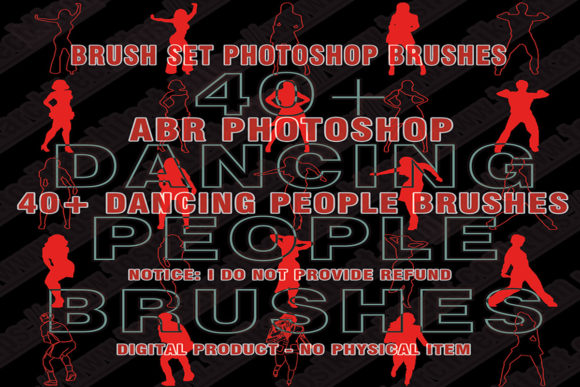
This article explores the utility, technical specifications, and creative potential of these digital assets, specifically focusing on comprehensive packs that include 40 Dancing People Brushes, DXF files, and formats compatible with industry-standard software like Adobe Photoshop and Procreate. By understanding how to effectively utilize these tools, designers can streamline their workflow and elevate the visual impact of their projects.
What Are Dancing People Brushes and Silhouette Vectors?
At their core, dancing people brushes are pre-configured digital stamp tools. Unlike standard round or square brushes that paint uniform strokes, these custom brushes contain high-resolution silhouettes of humans in various dynamic poses. When you click or drag the brush across your digital canvas, it stamps a realistic figure in mid-motion.
Silhouette vectors, on the other hand, are scalable graphic elements defined by mathematical paths rather than pixels. This means they can be resized infinitely without losing quality. When combined, brushes and vectors offer a dual approach to design: brushes provide speed and texture, while vectors offer precision and scalability.
The significance of these tools lies in their ability to bypass the time-consuming process of drawing human figures from scratch. For many designers, anatomy and perspective are difficult hurdles. These assets provide professionally rendered figures, created using advanced Photoshop and retouching techniques, ensuring that every limb and curve looks natural and balanced.
The Versatility of File Formats: ABR, DXF, and More
One of the most critical aspects of purchasing digital art assets is compatibility. A high-quality pack, such as the one featuring 40 unique dancing figures, typically includes a variety of file formats to ensure usability across different platforms. Understanding these formats is essential for maximizing the value of your purchase.
- ABR Files: These are native Adobe Photoshop brush files. They allow users to load the dancing silhouettes directly into the Photoshop brush library. Once loaded, artists can adjust size, opacity, and flow just like any standard brush.
- DXF Files: Drawing Exchange Format files are crucial for users of cutting machines like Silhouette Cameo or Cricut. These vector files allow crafters to cut out dancing figures from vinyl, paper, or fabric, bridging the gap between digital design and physical products.
- Procreate Compatibility: With the rise of iPad artistry, compatibility with Procreate is non-negotiable. High-quality brushes are optimized for touch interfaces, allowing artists to sketch and stamp on the go.
- PDF and Word Descriptors: Often overlooked, these files contain vital instructions. They guide users on how to extract, install, and troubleshoot the brushes, ensuring a smooth user experience even for beginners.
Practical Applications in Modern Design and Business
The utility of dancing people brushes extends far beyond hobbyist art. In professional settings, these tools serve specific functional purposes that enhance communication and branding.
Event Promotion and Marketing
Consider a dance studio, a music festival, or a fitness center. Their marketing materials need to convey energy and excitement instantly. Using silhouette cut files or brushes, a graphic designer can quickly create a flyer featuring a crowd of dancers. Instead of hiring models and organizing a photoshoot, the designer can arrange multiple silhouettes to create a sense of depth and community. This approach is cost-effective and allows for rapid iteration of designs.
Educational and Instructional Materials
In educational contexts, particularly in sports science or dance theory, visual aids are crucial. Instructors can use these vectors to demonstrate proper posture or movement sequences. Because the figures are silhouettes, they remove distractions like clothing brands or facial expressions, allowing students to focus entirely on the body mechanics and form.
Crafting and Physical Products
For small business owners who sell physical goods, the inclusion of DXF files is a game-changer. A crafter can use these files to create window decals for a yoga studio, iron-on transfers for t-shirts, or intricate paper decorations for wedding receptions. The ability to scale vector files ensures that the same design can be used for a small sticker or a large banner without any loss in resolution.
How to Install and Use Your Digital Assets
For those new to digital downloads, the process might seem intimidating. However, most packs, including those containing Instant Download links for Photoshop and Procreate, follow a straightforward workflow. Here is a step-by-step guide to getting started:
- Download and Extract: After purchasing, you will receive a link to download a compressed .ZIP file. Locate this file on your computer. Right-click the file and select "Extract All" (on Windows) or double-click it (on Mac) to unzip the contents. You should now see folders containing the ABR, DXF, PDF, and other files.
- Review the Descriptor: Open the included Word or PDF file. This document often contains specific installation tips, license agreements, and support contact information. Reading this first can save time later.
- Install in Photoshop: Open Adobe Photoshop. Go to the Brush panel, click the menu icon, and select "Import Brushes." Navigate to the extracted folder and select the .ABR file. Your dancing people brushes will now appear in your brush list.
- Import to Procreate: On your iPad, tap the Actions menu (wrench icon), select "Add," and then "Import." Choose the brush file from your files app. Procreate will automatically install the brush set.
- Use the DXF Files: Open your preferred cutting machine software (such as Silhouette Studio). Import the DXF file. You can now resize, rotate, and prepare the silhouette for cutting.
Common Misunderstandings About Digital Brushes
A common assumption among beginners is that using pre-made brushes is "cheating" or lacks artistic integrity. This is a misconception. Professional artists have used stamps, stencils, and references for centuries. Digital brushes are simply modern tools that handle the repetitive technical aspects of drawing, freeing the artist to focus on composition, lighting, and storytelling. Furthermore, these brushes are created using sophisticated retouching techniques, meaning they are high-quality artistic assets in their own right.
Another misunderstanding relates to file quality. Some users worry that digital files will look pixelated when printed. This is why the inclusion of vector formats like DXF is so important. While the ABR brushes are raster-based (pixel-based) and depend on resolution settings, the vector files remain crisp at any size. Knowing which format to use for which project is key to professional results.
Enhancing Creativity Through Technology
The integration of tools like 40 Dancing People Brushes into a designer's toolkit represents a broader trend in creative technology: the democratization of high-quality design resources. In the past, creating a complex scene with multiple human figures required advanced drawing skills and hours of labor. Today, these tasks can be accomplished in minutes, allowing creators to experiment more freely.
This accessibility encourages experimentation. A designer might try combining different poses, overlapping figures to create crowds, or adjusting opacity to create ghostly motion trails. The immediate feedback loop provided by digital tools allows for rapid learning and improvement. Moreover, because these are digital products, they are environmentally friendly, requiring no physical shipping or packaging materials.
Conclusion
Dancing people brushes and silhouette vectors are more than just convenient shortcuts; they are powerful tools that bridge the gap between imagination and execution. Whether you are a seasoned graphic designer looking to speed up your workflow, a crafter creating custom decals, or a beginner exploring digital art, these assets offer immense value. By providing multiple formats like ABR, DXF, and Procreate-compatible files, comprehensive packs ensure that you can use your creativity across any platform.
Understanding how to extract, install, and apply these resources empowers you to produce professional-grade work efficiently. As digital design continues to evolve, embracing these tools allows you to stay competitive, creative, and inspired. So, download your zip file, explore the possibilities, and let your designs move to the rhythm of your imagination.