Enhancing Digital Illustrations with Arrow Procreate Brushes: A Practical Guide
In the evolving landscape of digital illustration, the tools an artist chooses can significantly influence both workflow efficiency and the final aesthetic of a piece. Among the myriad of assets available for iPad artists, Arrow Procreate Brushes have emerged as a specialized resource for designers seeking to inject directionality and personality into their work. These brushes are not merely functional pointers; they are designed to serve as stylistic elements that bridge the gap between rigid graphic design and organic hand-drawn art. For professionals and hobbyists alike, understanding the specific utility of these tools is essential for determining whether they align with current project requirements.
Defining the Aesthetic and Utility
The primary appeal of Arrow Procreate Brushes lies in their ability to disrupt the sterility often associated with vector-based arrow graphics. Traditional arrows, created using shape tools in software like Adobe Illustrator or even native shape libraries within Procreate, tend to possess perfect geometric symmetry. While this precision is necessary for technical diagrams or corporate branding, it can feel cold or impersonal in creative contexts such as editorial illustrations, social media graphics, or personal journaling.
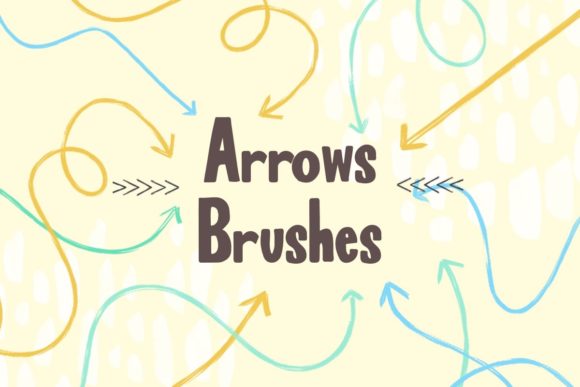
By contrast, these specialized brushes introduce a wavy and irregular quality that mimics the natural variation of human hand movement. This "funky" aesthetic adds a layer of warmth and approachability to designs. When an artist uses these brushes, the resulting lines exhibit subtle fluctuations in width and curvature, creating a playful visual rhythm. This distinct characteristic allows creators to focus attention in a specific direction without resorting to aggressive or industrial-looking indicators. The hand-drawn aesthetic serves as a visual cue that feels invited rather than imposed, making it particularly effective in user experience (UX) mockups, educational content, and informal marketing materials where tone is paramount.
Comparing Hand-Drawn Tools to Standard Vector Shapes
When evaluating whether to incorporate Arrow Procreate Brushes into a workflow, it is helpful to compare them against standard alternatives. The most common alternative is the use of pre-made vector shapes or the native shape tool found within Procreate. Each approach has distinct tradeoffs regarding time, flexibility, and visual outcome.
- Vector Shapes: These offer infinite scalability and perfect editability. If a client requests a change in angle or length, a vector shape can be adjusted instantly without loss of quality. However, achieving a "hand-drawn" look with vectors requires significant manual manipulation of anchor points, which can be time-consuming.
- Native Procreate Shapes: The built-in quick-shape feature allows for rapid creation of straight lines and basic arrows. While efficient, these lack the textured nuance and organic imperfection that define the charm of brush-based assets.
- Arrow Procreate Brushes: These provide immediate organic texture and style. They are ideal for rapid ideation and final renders where a casual tone is desired. The tradeoff is that they are raster-based, meaning they do not scale infinitely without potential pixelation, and adjusting the curve after drawing may require erasing and redrawing rather than simple node adjustment.
For artists who prioritize speed and a specific artistic voice over geometric perfection, the brush-based approach offers a compelling advantage. It removes the friction of over-engineering a simple directional cue, allowing the creator to maintain flow and momentum during the design process.
Technical Requirements and Integration
Before acquiring any digital asset, understanding the technical ecosystem is crucial. Arrow Procreate Brushes are distributed in the .brushset file format. This format is exclusive to the Procreate application, which runs on iOS and iPadOS. Consequently, these brushes are not compatible with desktop-based software such as Photoshop, Clip Studio Paint, or Affinity Designer unless the user employs complex workarounds that often strip away the dynamic brush engine data.
To access and utilize these files, an artist must have:
- An iPad capable of running the current or recent versions of iPadOS.
- The Procreate app installed from the App Store.
- Basic knowledge of how to import brush sets into the Procreate library.
This ecosystem limitation is a significant decision factor. For designers who work primarily on desktop computers or who require cross-platform compatibility, these brushes may present a workflow bottleneck. However, for those fully invested in the Apple ecosystem and the Procreate environment, the integration is seamless. The brushes appear immediately in the brush library, ready for customization regarding size, opacity, and pressure sensitivity, allowing for a high degree of control within the app’s intuitive interface.
Best-Fit Scenarios and Use Cases
Determining when to use Arrow Procreate Brushes depends largely on the intended audience and the medium of the final output. These tools excel in environments where authenticity and relatability are valued over corporate polish.
Social Media and Content Creation
In the fast-paced world of social media, particularly on platforms like Instagram and TikTok, visuals need to capture attention quickly. Wavy, hand-drawn arrows are highly effective for highlighting specific parts of an image or guiding the viewer’s eye through a carousel post. Their playful nature aligns well with the informal, behind-the-scenes content that performs well on these platforms. Using these brushes can make a brand appear more accessible and human-centric.
Educational Materials and Infographics
Teachers, coaches, and educational content creators often need to annotate diagrams or explain processes. Rigid, technical arrows can sometimes intimidate learners or feel overly academic. The softer, organic lines of these brushes create a friendlier learning environment. They are particularly useful in digital worksheets, e-books, and video thumbnails where the goal is to simplify complex information without sacrificing engagement.
UI/UX Wireframing and Prototyping
While final UI designs often require precision, the early stages of wireframing benefit from low-fidelity aesthetics. Using hand-drawn arrows in prototypes signals to stakeholders that the design is still in flux and open to feedback. This psychological cue can encourage more constructive criticism and prevent clients from fixating on minor visual details before the core functionality is established.
Limitations and Considerations
Despite their versatility, Arrow Procreate Brushes are not a universal solution. Artists should be aware of their limitations to avoid misapplication. Because these brushes rely on raster data, they are not ideal for large-format printing where scalability is critical, such as billboards or vehicle wraps. In such cases, vector-based arrows remain the superior choice.
Additionally, consistency can be a challenge. Since each stroke is generated by hand pressure and movement, achieving identical arrows across multiple pages or frames requires practice and steady hand control. For projects requiring strict uniformity, such as technical manuals or regulated industry documentation, the variability of these brushes may be perceived as unprofessional or distracting.
Furthermore, the "funky" aesthetic, while engaging, may not suit every brand identity. Luxury brands, financial institutions, or medical organizations often adhere to strict guidelines that favor clean, minimalist, and precise typography and graphics. In these contexts, the playful nature of wavy arrows could undermine the perceived authority or seriousness of the message.
Making an Informed Decision
Choosing the right tool involves balancing aesthetic goals with practical constraints. Arrow Procreate Brushes represent a niche but powerful addition to a digital artist’s toolkit. They are best suited for creators who value speed, organic texture, and a personable tone in their work. If your projects involve social media content, educational materials, or conceptual design where a hand-crafted feel enhances the message, these brushes offer a significant advantage over standard geometric shapes.
However, if your work demands infinite scalability, strict geometric precision, or cross-platform compatibility, you may find greater utility in vector-based solutions or native shape tools. By understanding the specific strengths and tradeoffs of these brushes, artists can make informed decisions that enhance their creative workflow without compromising the professional standards of their final deliverables. Ultimately, the value of Arrow Procreate Brushes lies not just in their function, but in their ability to convey emotion and direction through the subtle language of hand-drawn lines.