Mastering Time: A Complete Guide to the Clock Builder Procreate Brush Kit
In the rapidly evolving world of digital illustration, efficiency and creativity often go hand in hand. For artists using the iPad, Procreate has become the industry standard, offering a limitless canvas for expression. However, even the most skilled illustrators can find themselves bogged down by repetitive tasks. This is where specialized tools like the Clock Builder Procreate Brush Stamps come into play. Designed to streamline the creation of timepieces, this kit transforms a complex drawing process into an intuitive, enjoyable experience.
Whether you are designing a vintage pocket watch, a modern wristwatch, or incorporating clock imagery into a tattoo design, having the right Digital Tools at your disposal can significantly elevate your workflow. This article explores the significance of the Clock Builder kit, breaks down its extensive components, and explains how these 54 design elements can help you achieve professional results with ease.
The Evolution of Digital Watch Design
Historically, drawing intricate mechanical objects like clocks required a deep understanding of perspective, geometry, and shading. Artists had to manually construct every gear, hand, and frame from scratch. While this traditional approach builds fundamental skills, it is time-consuming. In modern creative workflows, especially for commercial projects or social media content, speed is essential.
The Clock Builders kit addresses this need by providing pre-made, high-quality assets that function as building blocks. Instead of starting from a blank slate, users can assemble unique timepieces by combining various stamps. This method does not replace artistic skill; rather, it enhances it by allowing the artist to focus on composition, color theory, and storytelling rather than technical construction.
Why Use Procreate Stamps?
Procreate Stamps are essentially custom brushes that stamp an image onto the canvas instead of drawing a line. For object-heavy illustrations, such as jewelry or machinery, stamps ensure consistency and precision. When using the Clock Builder kit, each stamp is optimized for pressure sensitivity and rotation, giving you full control over the final look. This flexibility makes the kit suitable for a wide range of applications, from flat graphic design to realistic 3D-style renderings.
Exploring the Contents of the Kit
One of the standout features of this project is its comprehensive nature. The inspiration for these stamps and colors comes directly from the creator’s sketchbook, ensuring that every element feels organic and hand-crafted rather than sterile or generic. The kit is delivered in a single zip file, making it easy to download and install on your iPad. Let’s dive into what is included and how each component contributes to your artistic success.
1. The Clocks Brushset: 54 Stamps
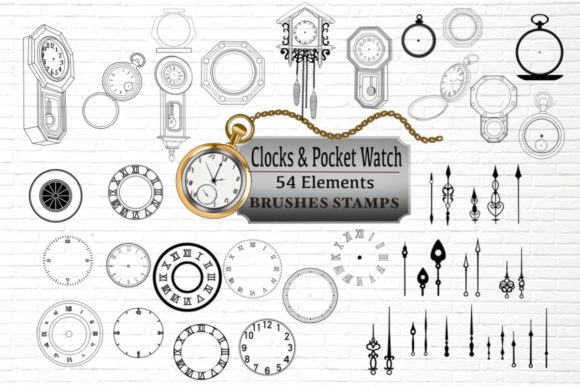
The core of the kit is the .brushset file, which contains 54 distinct stamps categorized for easy access. These elements are designed to work together seamlessly, allowing for endless combinations.
- 19 Clock Faces: The face is the personality of the watch. This selection includes various styles, from minimalist modern dials to ornate Roman numeral designs. Having multiple options allows you to match the clock to the era or aesthetic of your artwork.
- 10 Clock Hands: Time is indicated by the hands, and their shape can drastically change the vibe of the piece. The kit offers a variety of hour, minute, and second hands, ranging from sleek and thin to bold and decorative.
- 4 Chain Flow Brushes: These are particularly useful for adding realism to pocket watches or hanging wall clocks. The flow brushes allow you to paint chains that naturally follow your stroke path, saving hours of manual linking.
- 9 Clock Frames: The frame holds everything together. Whether you need a rugged metal bezel or a delicate gold rim, these frames provide the structural boundary for your design.
- 7 Pocket Watch Designs: For those interested in vintage aesthetics, these standalone stamps offer complete pocket watch bodies. They are perfect for Watch Tattoo Builder projects or historical illustrations.
- 5 Other Clocks: This category includes unique variations that don’t fit strictly into the other groups, offering surprise elements to keep your designs fresh.
2. Color Palette: 30 Curated Swatches
A great design is nothing without the right color. The kit includes a .swatch file featuring 30 carefully selected colors. These hues were chosen to complement the metallic and glass textures typical of clockmaking. You will find rich golds, silvers, bronzes, and deep blacks, as well as accent colors for clock faces. Using a cohesive palette ensures that your final artwork looks polished and professional.
Practical Applications for Artists
The versatility of the iPad Clock Builder Procreate kit means it fits into various creative niches. Here is how different types of artists can leverage these tools.
Tattoo Design and Body Art
Clocks and watches are popular motifs in tattoo art, symbolizing the passage of time, mortality, or specific memories. The Watch Tattoo Builder aspect of this kit allows tattoo artists to quickly mock up designs for clients. By mixing and matching frames, faces, and hands, artists can create custom concepts in minutes rather than hours. The high-resolution stamps ensure that when the design is transferred to stencil form, the lines remain crisp and clear.
Fashion and Accessory Illustration
Fashion illustrators often need to depict accessories to complete a look. Drawing a realistic watch from scratch can be daunting due to the reflective surfaces and intricate details. With this kit, you can drop in a base clock structure and then use Procreate’s blending modes to add reflections and shadows. This speeds up the illustration process, allowing designers to present more concepts to clients in less time.
Educational and Editorial Graphics
In educational materials or editorial articles about time management, history, or technology, custom clock illustrations can make content more engaging. Instead of relying on stock photos, educators and designers can create bespoke visuals that match their brand’s color scheme and style. The Brush DIY nature of the kit encourages experimentation, making it a fun project for students learning digital art.
How to Get Started: A Step-by-Step Approach
If you are new to using brush stamps in Procreate, here is a simple workflow to help you get the most out of this kit.
- Install the Files: Unzip the downloaded file. Tap on the .brushset to import it into Procreate. Do the same for the .swatch file to add the color palette to your library.
- Choose Your Base: Start by selecting a clock face from the 19 available options. Stamp it onto a new layer.
- Add the Frame: On a separate layer, choose a frame that complements the face. Adjust the size and rotation to fit perfectly.
- Set the Time: Add the clock hands. You can rotate them independently to show any time you wish. This is a great way to add symbolic meaning to your art (e.g., stopping time at a significant moment).
- Detailing: Use the chain flow brushes if you are creating a pocket watch. Add shadows and highlights using standard Procreate brushes to give the flat stamps a three-dimensional appearance.
- Colorize: Apply the 30-color swatch palette. Use clipping masks to change the color of specific elements without affecting the rest of the drawing.
Enhancing Your Artwork with Customization
While the stamps provide a strong foundation, the true magic happens when you customize them. Procreate’s powerful editing tools allow you to warp, distort, and recolor the stamps. For example, you can use the Liquify tool to bend a clock face, creating a surreal, Dalí-inspired effect. You can also adjust the opacity of layers to create ghostly, transparent overlays.
The inspiration from the creator’s sketchbook means that these elements have a human touch. They are not perfect geometric vectors; they have character. Embracing this imperfection can make your artwork look more fabulous and authentic. By combining these elements, you are not just assembling a clock; you are participating in a creative process that bridges traditional sketching with modern digital convenience.
Conclusion
The Clock Builder Procreate Brush Stamps kit is more than just a collection of images; it is a toolkit for creative empowerment. With 54 design elements, including diverse clock faces, hands, frames, and specialized chain brushes, it removes the technical barriers to drawing complex timepieces. The inclusion of a curated 30-color palette further ensures that your designs are visually harmonious.
Whether you are a tattoo artist looking to streamline your consultation process, a fashion illustrator needing quick accessory renders, or a hobbyist wanting to explore Brush DIY techniques, this kit offers immense value. It transforms a potentially tedious task into a fun, interactive project. By integrating these digital tools into your workflow, you can focus less on construction and more on creativity, helping you achieve greater success in your artistic endeavors. Download the kit, open your iPad, and start building your own masterpiece today.