Mastering Tattoo Concepts with Procreate Tattoo Design Stamps Brush
The digital landscape of tattoo artistry has evolved rapidly, shifting from traditional sketchbooks to the sleek, responsive canvas of the iPad. For professional tattoo artists and aspiring designers alike, the pressure to produce high-quality, unique concepts quickly is immense. Clients often arrive with vague ideas, requiring the artist to visualize complex imagery in real-time or during brief consultation windows. This is where specialized digital tools become not just a luxury, but a necessity. The Procreate Tattoo Design Stamps Brush set emerges as a pivotal resource in this workflow, offering a streamlined approach to creating intricate tattoo flash sheets and custom designs. By integrating pre-made elements with manual artistry, designers can significantly reduce drafting time while maintaining a high standard of aesthetic precision.
Understanding the Toolset and Its Components
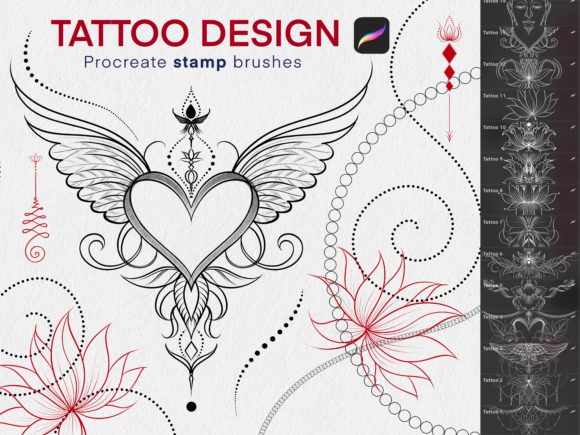
At its core, the Procreate Tattoo Design Stamps Brush collection is a curated library designed exclusively for the Procreate application. It is important to note that this toolset is not compatible with other drawing software; it requires an iPad (such as the iPad Pro or standard iPad), an Apple Pencil, and Procreate Version 5.0 or higher. The set comprises 26 distinct brushes, strategically divided into two functional categories: 21 stamp brushes and 5 standard brushes. This division is intentional, addressing the two primary phases of tattoo design: composition and detailing.
The 21 stamp brushes act as instant assets. Unlike traditional brushes that paint pixel by pixel, stamp brushes place entire pre-drawn elements onto the canvas with a single tap or stroke. These elements often include common tattoo motifs such as roses, skulls, daggers, snakes, or ornamental patterns. The remaining 5 brushes are typically designed for lining, shading, or texturing, allowing the artist to blend the stamped elements seamlessly into a cohesive piece. This hybrid approach ensures that the final design does not look like a collage of disjointed parts but rather a unified work of art.
Solving the Time-Efficiency Challenge
One of the most significant challenges facing modern tattoo artists is the bottleneck of concept generation. Drawing every leaf of a rose or every scale of a serpent from scratch for every client consultation is unsustainable. It leads to artist burnout and limits the number of clients an artist can serve in a day. The Procreate Tattoo Design Stamps Brush directly addresses this pain point by providing a library of high-quality base elements.
Consider a scenario where a client requests a neo-traditional sleeve featuring floral elements intertwined with geometric shapes. Using standard methods, the artist might spend hours sketching the foundational flowers. With the stamp brushes, the artist can place these complex floral structures instantly. The focus then shifts from repetitive drafting to creative arrangement and customization. This shift allows the artist to spend more time on what truly matters: adjusting the flow to fit the client’s anatomy and adding unique personal touches that define their style. The result is a faster turnaround time without sacrificing quality, enabling artists to handle more consultations and bookings efficiently.
Practical Applications and Workflow Integration
Integrating the Procreate Tattoo Design Stamps Brush into your workflow requires a strategic approach. It is not merely about dragging and dropping images; it is about using these stamps as a foundation for original creation. Here are several practical ways to utilize this toolset effectively:
- Flash Sheet Creation: Tattoo conventions and studio walk-ins rely heavily on flash sheets. Artists can use the 21 stamp brushes to rapidly populate a page with varied designs. By rotating, resizing, and recoloring the stamps, a single element can be transformed into multiple unique pieces, allowing for the quick production of extensive flash collections.
- Consultation Visualization: During client meetings, speed is crucial. If a client wants to see how a dagger looks with a specific banner, the artist can stamp both elements, adjust their positions, and add shading using the included line brushes. This real-time visualization helps clients commit to designs faster, reducing hesitation and back-and-forth communication.
- Style Consistency: For artists building a brand, consistency is key. Using a standardized set of stamps ensures that certain recurring motifs maintain the same line weight and stylistic flair across different projects. This helps in establishing a recognizable signature style.
To achieve the best outcomes, it is recommended to use the stamp brushes on separate layers. This non-destructive editing technique allows you to move, resize, or delete individual elements without affecting the rest of the design. Furthermore, utilizing the opacity settings and blending modes in Procreate can help integrate the stamps with hand-drawn backgrounds, creating depth and dimension.
Tailoring the Approach for Different Users
Different users will approach the Procreate Tattoo Design Stamps Brush set in varied ways, depending on their skill level and professional goals.
For Established Professionals: The primary value lies in efficiency. These artists already have a refined style and a steady client base. For them, the brush set serves as a productivity multiplier. They may use the stamps to block out compositions quickly, focusing their energy on complex shading and custom details that justify their premium pricing. The 5 included detail brushes are particularly valuable here, allowing for seamless integration of the stamped elements with their hand-drawn linework.
For Apprentices and Students: The set serves as an educational tool. By studying the structure of the stamped elements, learners can understand how professional tattoo designs are constructed. They can analyze how lines flow, how balance is achieved, and how negative space is utilized. However, it is crucial for beginners to avoid over-reliance. The goal should be to use the stamps as references or starting points, gradually transitioning to drawing these elements manually to develop muscle memory and artistic independence.
For Digital Illustrators: Even those who do not intend to tattoo can benefit from this set. The aesthetic of tattoo art—bold lines, high contrast, and symbolic imagery—is popular in graphic design and illustration. The Procreate Tattoo Design Stamps Brush can be used to create edgy poster art, apparel designs, or logo concepts that require a rugged, ink-inspired look.
Technical Considerations and Best Practices
To maximize the potential of this toolset, users must adhere to specific technical requirements. As noted, the brushes are exclusive to Procreate Version 5.0 and higher. Older versions may not support the dynamic properties of the stamp brushes, leading to glitches or improper rendering. Additionally, the performance of the brushes can depend on the hardware. While they function on standard iPads, the iPad Pro combined with the Apple Pencil offers the lowest latency and highest pressure sensitivity, which is crucial when using the 5 detail brushes for fine linework.
It is also essential to consider resolution. Tattoo designs must be crisp and clean, as they will be transferred to skin via stencils. When using the Procreate Tattoo Design Stamps Brush, ensure your canvas size is sufficiently large (e.g., 300 DPI at print size) to prevent pixelation. Scaling up a small stamped image too much can result in blurry edges, which compromises the quality of the final stencil.
Finally, customization is key. While the stamps provide a strong foundation, relying on them unchanged can make designs feel generic. Artists should experiment with color palettes, layer effects, and manual alterations. Combining the stamp elements with hand-drawn backgrounds, textures, or typography creates a bespoke piece that resonates more deeply with clients. The Procreate Tattoo Design Stamps Brush is not a replacement for artistic skill but a powerful amplifier of it, allowing creators to focus on innovation rather than repetition.
In conclusion, the integration of the Procreate Tattoo Design Stamps Brush into a digital tattoo workflow represents a smart investment in time and creativity. By addressing the common challenges of speed and consistency, this toolset empowers artists to deliver high-quality concepts efficiently. Whether you are a seasoned professional looking to optimize your consultation process or a student aiming to understand design composition, these 26 brushes offer a versatile solution. Embracing this technology allows artists to stay competitive in a fast-paced industry, ensuring that every client leaves with a design that is both visually striking and personally meaningful.