Mastering Composition with the Lettering Grid for Procreate Stamp Brush
Digital hand lettering has evolved from a niche hobby into a vital skill for modern creatives, marketers, and entrepreneurs. Whether you are designing social media graphics, creating custom logos, or illustrating educational materials, the pressure to produce polished, professional typography is constant. However, the gap between having a steady hand and achieving perfect composition is often wider than anticipated. This is where the Lettering Grid for Procreate Stamp Brush becomes an indispensable tool in your digital workflow. It bridges the divide between raw artistic intent and structured design execution, allowing creators to focus on style rather than struggling with alignment.
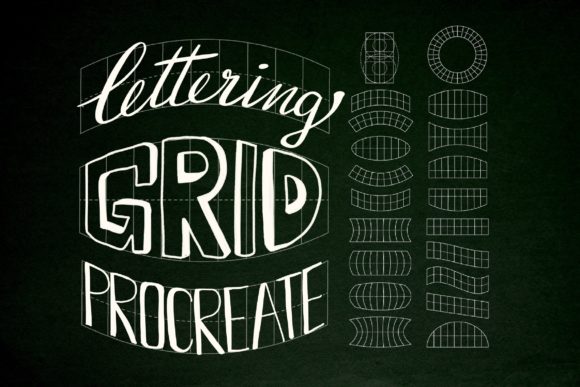
Integrating a specialized tool like this into your process is not about replacing skill; it is about enhancing efficiency and consistency. By utilizing a set of 20 distinct lettering grids, you establish a reliable foundation for every project. This approach ensures that your hand-lettered pieces maintain visual harmony, regardless of the complexity of the phrase or the constraints of the canvas. For professionals managing tight deadlines, this level of structural support can significantly reduce revision time and improve overall output quality.
Understanding the Role of Structural Guides in Digital Lettering
Before diving into the technical setup, it is crucial to understand why grid systems matter in hand lettering. In traditional graphic design, grids are used to organize content, create hierarchy, and ensure balance. When applied to hand lettering, these principles remain identical. Freehand lettering without guides often results in uneven baseline shifts, inconsistent spacing, and distorted proportions. These subtle errors can distract viewers and diminish the perceived professionalism of the work.
The Lettering Grid for Procreate Stamp Brush functions as a dynamic template system. Unlike static background images that must be manually resized and aligned for each new project, stamp brushes allow you to place pre-designed grid structures instantly onto your canvas. This immediacy supports a fluid creative process. You can experiment with different layouts—such as circular badges, linear banners, or complex geometric frames—without losing momentum. The ability to toggle these grids on and off, or adjust their opacity, gives you complete control over the planning phase of your design.
This tool fits seamlessly into the broader context of digital asset management. For educators teaching typography, it provides a standardized method for demonstrating spacing rules. For small business owners creating their own branding materials, it offers a way to achieve agency-quality results without extensive training in vector software. The key is recognizing that the grid is not a crutch, but a scaffold that supports higher-level creative decisions.
Workflow Integration: From Concept to Final Export
To maximize the value of the Set of 20 Lettering grids for Procreate, consider how they interact with your existing workflow. A typical lettering project involves several stages: conceptualization, sketching, refining, inking, and coloring. The grid system primarily enhances the conceptualization and sketching phases, but its benefits extend throughout the entire process.
Preparation and Setup
The first step in implementing this tool is proper installation and organization. Since the files are delivered in a .brushset format, they are designed exclusively for the Procreate app on iPad. It is important to note that these digital brushes will not function in Photoshop, Illustrator, or other desktop software. This specificity requires a mobile-first or tablet-centric workflow. Ensure your Apple Pencil is calibrated and your Procreate app is updated to the latest version to guarantee smooth performance.
Once installed, organize your brush library logically. Create a dedicated folder for your lettering assets, placing the grid stamps alongside your favorite ink and texture brushes. This proximity reduces friction when switching between tools. Before starting a new piece, select a canvas size appropriate for your final output. High-resolution canvases are recommended if you plan to print the final design, as the grid lines must remain crisp enough to serve as accurate guides.
Composition and Drafting
With your canvas ready, begin by selecting a grid from the set of 20 options. Each grid serves a different compositional purpose. Some may offer straight baselines ideal for quotes, while others provide curved paths for logos or emblems. Stamp the grid onto a new layer and lower its opacity to approximately 20-30%. This visibility level allows you to see the guide clearly without it interfering with your final ink lines.
Start sketching your letters directly over the grid. Use the lines to maintain consistent x-heights, ascenders, and descenders. If you are working on a complex word, break it down into smaller segments, aligning each letter to the grid’s structure. This methodical approach prevents the common issue of running out of space at the end of a word. If the initial layout feels cramped, you can easily delete the grid layer and stamp a different variation, adjusting the scale or position as needed. This flexibility is far superior to drawing guidelines manually for every new project.
Refinement and Execution
Once the skeleton of your lettering is established, create a new layer above the grid for your refined sketch. Here, you can add flourishes, connect letters, and adjust weights. Because the underlying structure is solid, you can take creative risks with stylistic elements without worrying about the overall balance collapsing. After finalizing the sketch, proceed to your inking layer. Many artists choose to hide the grid layer completely during the inking phase to avoid visual clutter, relying on the muscle memory developed during the sketching stage.
For those who prefer visible guidelines during inking, keep the grid layer at a very low opacity. The precision offered by the Lettering Grid for Procreate Stamp Brush ensures that your ink lines remain clean and proportional. This consistency is particularly valuable for commercial projects where brand guidelines dictate strict typographic standards.
Enhancing Efficiency and Consistency Across Projects
One of the most significant advantages of using a standardized set of grids is the ability to maintain consistency across multiple designs. For marketers and social media managers, creating a cohesive visual identity is essential. By using the same grid structures for a series of posts, you create a recognizable pattern that audiences associate with your brand. This repetition builds trust and professionalism.
Furthermore, this tool facilitates collaboration. If you are working with a team, sharing the same grid set ensures that all members are working from the same structural baseline. This reduces the need for extensive feedback loops regarding alignment and spacing. Designers can focus their critiques on style, color, and messaging, knowing that the foundational composition is already sound.
From a productivity standpoint, the time saved on setting up manual guides adds up quickly. What might take ten minutes to construct manually can be achieved in seconds with a stamp brush. Over the course of a week or month, this accumulated time allows for more experimentation, additional client revisions, or simply a healthier work-life balance. For freelancers billing by the hour, this efficiency translates directly into improved profitability.
Practical Tips for Optimal Results
- Layer Management: Always keep your grid layers separate from your artwork. Name them clearly (e.g., "Grid Guide") and group them if you use multiple variations in one file. This keeps your layer stack organized and easy to navigate.
- Opacity Control: Experiment with different opacity levels. A heavier guide might be helpful for beginners, while experienced letterers may prefer a faint whisper of a line to guide their hand without restricting creativity.
- Combining Tools: Use the grid in conjunction with Procreate’s built-in Drawing Guide feature. While the stamp brushes provide specific lettering structures, the global Drawing Guide can help with overall canvas symmetry.
- Customization: Although the set includes 20 predefined grids, you can modify them. Duplicate a grid layer, transform it, or add additional elements to create custom templates tailored to specific client needs.
- Backup Your Work: Since these are digital assets, ensure your Procreate files are backed up regularly. Cloud synchronization services can help prevent data loss, protecting both your artwork and your custom brush libraries.
Long-Term Value and Skill Development
Using the Lettering Grid for Procreate Stamp Brush is not just about immediate convenience; it is also a learning tool. By consistently working within structured frameworks, you internalize the rules of good typography. Over time, you will develop a better eye for spacing and balance, even when working without guides. The grid acts as a training wheel that eventually becomes a safety net, allowing you to push your artistic boundaries with confidence.
For educators, this tool provides a tangible way to teach abstract concepts of kerning and leading. Students can visually see how letters fit within a defined space, making theoretical lessons practical and actionable. For hobbyists, it lowers the barrier to entry, making the art of hand lettering accessible and enjoyable rather than frustrating.
In conclusion, the integration of the Set of 20 Lettering grids for Procreate into your digital toolkit represents a strategic investment in your creative process. It addresses the fundamental challenges of composition and consistency, allowing you to produce high-quality hand-lettered art with greater speed and reliability. Whether you are a seasoned professional or an aspiring creator, embracing this structured approach will elevate your work and streamline your workflow, ensuring that your focus remains where it belongs: on creativity and expression.