Polka Dots Procreate Brush Set Guide
Fashion illustration has always been a delicate balance between artistic expression and technical precision. For digital artists working on the iPad Pro, the pressure to produce high-quality, textured work quickly is real. This is where the Polka Dots Procreate Brush Set steps in as a game-changer. It is not merely a collection of stamps; it is a versatile toolkit designed to streamline the creation of fabric textures, specifically focusing on the timeless and challenging polka dot pattern. By integrating these tools into your workflow, you can bypass the tedious manual placement of dots and focus on the broader composition of your fashion sketches.
Why Texture Matters in Digital Fashion Design
In the world of fashion illustration, fabric texture tells a story. It communicates weight, movement, and personality. A flat color fill rarely captures the essence of a silk blouse or a cotton summer dress. Polka dots, in particular, present a unique challenge. Drawing them by hand requires consistent spacing and size, which is incredibly time-consuming. Even using basic shape tools can result in rigid, unnatural patterns that fail to drape correctly over the illustrated figure.
The Polka Dots Procreate Brush Set addresses this pain point directly. It allows illustrators to apply complex patterns with the fluidity of a traditional brush stroke. This means the dots follow the contour of your sketch, wrapping around arms, waists, and flowing skirts naturally. For professionals and hobbyists alike, this shift from manual construction to intuitive painting saves hours of work while elevating the visual quality of the final piece.
Key Features of the Brush Collection
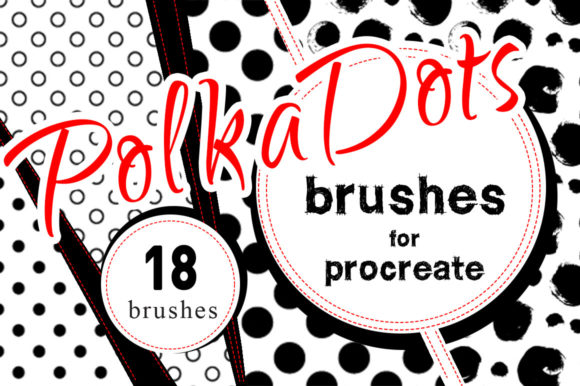
This set includes 18 distinct brushes, each engineered for specific effects within the Procreate app. The diversity of the tools ensures that you are not limited to a single look. Whether you need subtle, tiny dots for a sophisticated blouse or bold, large circles for a playful retro dress, there is a brush tailored for that purpose.
- Versatility: The brushes support various styles, from realistic fabric simulations to stylized, graphic interpretations.
- Instant Results: The primary benefit is speed. What might take thirty minutes to draw manually can be achieved in seconds.
- iPad Pro Optimization: Designed specifically for use with the Apple Pencil, the brushes respond dynamically to pressure and tilt, offering a natural drawing experience.
One notable quality of this set is its ease of integration. You simply install the brushes, select your preferred tool, and start drawing. There is no steep learning curve or complex configuration required. This accessibility makes it ideal for educators teaching digital art, as well as freelancers who need to deliver client work under tight deadlines.
Practical Applications for Creators and Businesses
The utility of the Polka Dots Procreate Brush Set extends beyond simple hobbyist sketching. Its applications span across several professional and commercial environments.
Fashion Illustration and Design
For fashion designers, rapid prototyping of ideas is crucial. These brushes allow for quick visualization of how different dot sizes and densities affect the overall look of a garment. You can experiment with color combinations and layering effects without committing to a final design immediately. This iterative process fosters creativity and helps in making informed design decisions before moving to physical production.
Digital Content and Social Media
Marketers and content creators often need eye-catching visuals for social media campaigns. Fashion-forward brands, in particular, benefit from unique, hand-drawn aesthetics that stand out in a feed saturated with stock photography. Using these brushes, you can create engaging posts, story highlights, and promotional materials that feature custom polka dot patterns. This adds a layer of authenticity and artistic flair that resonates with audiences aged 20–50 who appreciate crafted content.
Educational Resources
Educators teaching digital illustration can use this set to demonstrate the importance of texture and pattern in design. It serves as an excellent tool for students to understand how digital tools can mimic traditional media. By showing how a brush can automate repetitive tasks, teachers can focus more on composition, color theory, and anatomy in their lessons.
Maximizing Efficiency with Tool Selection
To get the most out of the Polka Dots Procreate Brush Set, it is recommended to use the tool selection feature within Procreate effectively. Organizing your brushes into a dedicated group ensures they are always within reach. Furthermore, understanding how to adjust the size and opacity of each brush can significantly enhance your results.
For instance, using a lower opacity can create a sense of depth, allowing underlying colors or shadows to show through the dots. This technique is particularly useful for illustrating sheer fabrics or adding subtle texture to a garment without overwhelming the design. Experimenting with different blend modes can also yield interesting effects, such as making the dots appear as if they are printed on the fabric rather than floating above it.
Enhancing Branding and Visual Identity
For entrepreneurs and business owners, consistent visual identity is key. Polka dots are a classic pattern that can be associated with playfulness, elegance, or retro charm, depending on the execution. By using a consistent set of brushes, you can maintain a uniform style across all your digital assets. This consistency helps in building brand recognition and trust among your audience.
Consider a boutique owner who wants to create digital lookbooks. Using the Polka Dots Procreate Brush Set allows them to produce cohesive illustrations that match their brand’s aesthetic. Whether it’s for email newsletters, website banners, or packaging designs, the ability to generate high-quality, custom patterns quickly is a significant competitive advantage.
Tips for Best Results
While the brushes are designed for ease of use, a few practical considerations can help you achieve professional-grade results:
- Layer Management: Always paint your patterns on separate layers. This allows you to adjust the position, opacity, or color of the dots without affecting the underlying sketch or base colors.
- Reference Images: Keep reference images of real polka dot fabrics nearby. Observing how light interacts with the pattern and how the dots distort with fabric folds can inform your brush strokes.
- Color Harmony: Choose dot colors that complement your base fabric color. High contrast creates a bold statement, while low contrast offers a subtle, sophisticated look.
- Practice Variation: Don’t rely on a single brush for every project. Rotate through the 18 brushes to find the one that best suits the specific mood and style of your illustration.
In conclusion, the Polka Dots Procreate Brush Set is more than just a digital asset; it is a productivity booster for any illustrator working on the iPad Pro. By eliminating the tedious aspects of pattern drawing, it frees up creative energy for more important design decisions. Whether you are a seasoned professional, a budding entrepreneur, or a passionate hobbyist, these tools offer a practical solution to a common artistic challenge. Embrace the efficiency and versatility they provide, and watch your fashion illustrations reach new heights of quality and appeal.