Floral Frame Procreate Brushes Guide
Digital illustration has evolved rapidly, yet the desire for organic, hand-crafted aesthetics remains stronger than ever. Whether you are designing wedding invitations, creating social media graphics, or journaling on your iPad, the need for elegant borders that do not look stiff or computer-generated is a common challenge. This is where specialized tools come into play. The Floral Frame Procreate Brushes offer a streamlined solution for artists and designers who want to add a touch of botanical elegance without spending hours drawing every leaf and petal from scratch.
These brushes are designed to bridge the gap between professional graphic design and the warmth of hand-drawn art. By utilizing minimal line work, they provide a versatile foundation for various creative projects. If you are looking to enhance your digital workflow with assets that feel personal and engaging, understanding how to leverage this specific brush set can significantly elevate your output.
Understanding the Appeal of Minimal Line Art
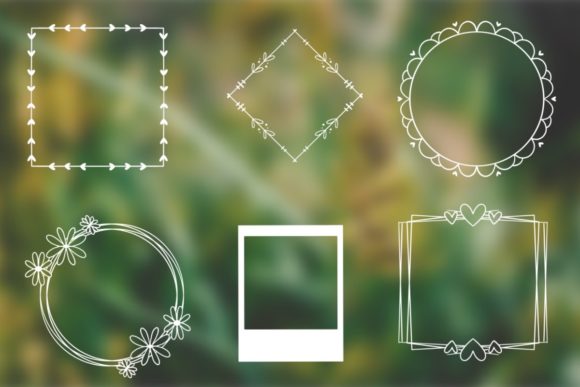
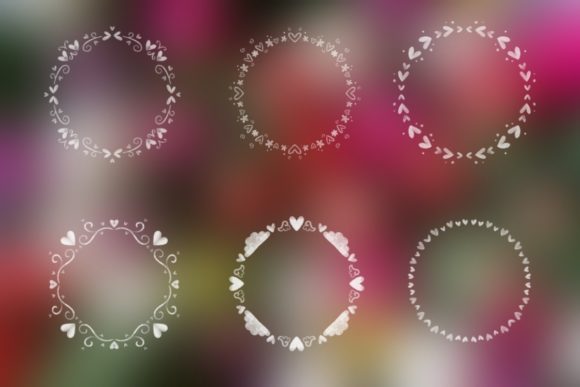
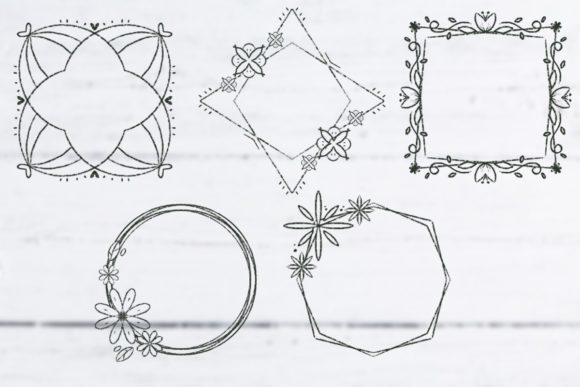
The core characteristic of this brush set is its reliance on minimal design. In the world of digital art, "minimal" does not mean lacking detail; rather, it refers to clarity and intentionality. The cute line art frames included in this collection utilize clean strokes to establish an engaging hand-drawn effect. This style is particularly popular because it is unobtrusive. It frames your content—whether that is text, a photograph, or another illustration—without overpowering it.
Many beginners struggle with composition. They often draw borders that are too thick or too complex, distracting the viewer from the main subject. These floral frames solve that problem by offering a delicate structure. The lines are thin enough to feel airy but distinct enough to define space. This balance makes them ideal for modern design trends that favor whitespace and simplicity. When you use these brushes, you are not just adding decoration; you are guiding the viewer’s eye toward the center of your composition.
Practical Applications for Creators and Businesses
The versatility of the Floral Frame Procreate Brushes means they fit seamlessly into numerous workflows. Here are several realistic scenarios where these tools add immediate value:
- Social Media Content: Influencers and small business owners often need to create quote cards or announcement posts. A floral frame provides a ready-made template that makes text pop against busy backgrounds.
- Wedding and Event Stationery: For freelance designers, speed is essential. Using pre-made line art frames allows you to customize invitations quickly while maintaining a bespoke, hand-lettered feel.
- Digital Planning and Journaling: Hobbyists who use GoodNotes or Procreate for digital planning can use these frames to section off daily tasks, mood trackers, or gratitude logs.
- Product Packaging: Entrepreneurs selling handmade goods, such as candles or soaps, can use these digital frames to design labels that convey a natural, organic brand identity.
Each of these use cases benefits from the "hand-drawn" aesthetic. In a digital age where everything can look perfectly polished and sterile, imperfections and organic lines create a sense of trust and authenticity. Customers and viewers often respond more positively to designs that feel human-made.
Technical Requirements and File Compatibility
Before purchasing or downloading any digital asset, it is crucial to understand the technical specifications. This specific set is optimized for the Apple ecosystem. The software needed to access these brushes is Procreate on iOS and iPadOS. This means you will need an iPad and the Procreate app installed to utilize them effectively.
The files included are in the .brushset format. This is the native file type for Procreate brush libraries. Installing them is straightforward: you simply tap the file on your iPad, and it automatically imports into your Procreate brush library. There is no need for complex conversion processes or third-party software. However, it is important to note that these brushes will not work in Photoshop, Clip Studio Paint, or other desktop-based illustration programs unless you are using a specific emulation layer or converting them manually, which is generally not recommended for standard users.
For those new to the iPad art scene, ensuring your device is updated to a compatible version of iPadOS is a good practice. Older devices may still run Procreate, but performance with multiple layers and high-resolution canvases can vary. The Floral Frame Procreate Brushes are lightweight, so they should perform well on most modern iPads, but keeping your software current ensures the best experience.
How to Integrate These Brushes into Your Workflow
Using these brushes effectively requires more than just stamping them onto a canvas. To get the most out of the engaging hand-drawn effect, consider the following techniques:
- Layer Management: Always place your floral frame on a separate layer above your background but below your main text or subject. This allows you to adjust the opacity or color of the frame without affecting the rest of your design.
- Color Customization: While black line art is classic, do not be afraid to experiment. Try using soft pastels, muted earth tones, or even white lines on a dark background. The minimal design holds up well in various color palettes.
- Combining Elements: You can stretch, rotate, or distort the frames to fit different aspect ratios. If a frame feels too empty, add simple leaf accents or dots using other basic brushes in Procreate to fill negative space.
- Mixing Media: These line art frames pair beautifully with watercolor textures. Import a watercolor wash as a background, place your floral frame on top, and add your text. The contrast between the soft texture and the crisp lines creates visual interest.
Remember, the goal is to enhance your project, not dominate it. Start with a light touch. You can always add more elements later, but removing clutter is often harder. The beauty of digital art is its non-destructive nature; feel free to experiment with placement and scale until the composition feels balanced.
Important Considerations Before You Start
While these brushes are a powerful tool, they are not a substitute for fundamental design principles. It is essential to consider typography pairing. Since the frames are delicate, avoid using overly bold or heavy fonts that might clash with the thin lines. Serif fonts or handwritten scripts often complement floral line art better than stark, industrial sans-serifs.
Additionally, think about your target audience. If you are designing for a corporate tech client, a floral frame might not align with their brand identity. However, for lifestyle brands, wellness coaches, bakeries, and creative entrepreneurs, this aesthetic is highly effective. Always align your design choices with the message you are trying to convey.
Finally, keep learning. Tools like the Floral Frame Procreate Brushes are most effective when used by someone who understands basic composition. Take time to study how light, shadow, and balance work in graphic design. The brushes provide the elements, but your eye provides the artistry.
Adding this set to your collection is a small step that can yield significant improvements in your design efficiency and aesthetic quality. Whether you are a seasoned professional looking to speed up your workflow or a beginner eager to create beautiful designs, these brushes offer a reliable, charming, and versatile resource. Start using them today to bring a fresh, organic feel to your upcoming art or graphic design projects.