Mastering Precision: The Essential Guide to the Procreate Ruler Template
If you have ever tried to sketch a perfect floor plan, draft a technical illustration, or simply align text in Procreate, you likely encountered the same frustrating limitation: the native interface lacks physical, scalable rulers. While the app offers drawing guides and symmetry tools, it does not provide a tangible, movable ruler object that you can drag, rotate, and scale directly on your canvas. This gap in functionality is exactly why many digital artists turn to a specialized Procreate Ruler Template. It bridges the divide between freehand creativity and architectural precision, offering a workaround that feels intuitive and immediate.
Why Native Tools Aren’t Always Enough
The Ruler tool in Procreate exists, but it functions primarily as a straight-edge guide for the brush stroke rather than a visual reference for measurement or layout. For casual sketching, this is sufficient. However, for professionals working in interior design, fashion illustration, or comic book lettering, the lack of a visible, scalable scale creates unnecessary friction. You might find yourself guessing distances or relying on complex grid setups that clutter the workspace. A dedicated template solves this by providing clear, high-contrast visual markers that stay out of the way until you need them, allowing for accurate scaling without breaking your creative flow.
Real-World Applications for Digital Artists
The utility of a Procreate Ruler Template extends far beyond simple line drawing. Different industries and creative disciplines benefit from these tools in unique ways.
Interior Design and Architecture
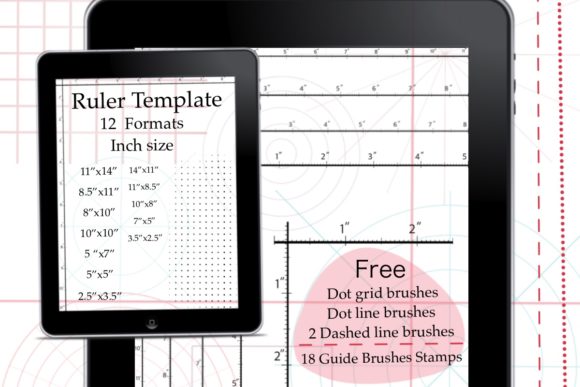
For interior designers sketching concepts on an iPad, accuracy is paramount. When presenting a room layout to a client, proportional correctness builds trust. Using templates with specific formats—such as 2.5, 3.5, or 5-inch scales—allows designers to quickly verify dimensions within their digital sketches. Instead of switching between apps to measure, the ruler sits directly on the canvas, enabling real-time adjustments to furniture placement or wall spacing.
Fashion Illustration and Technical Flats
Fashion illustrators often need to maintain consistent proportions across multiple garment sketches. A vertical ruler template helps align hemlines, necklines, and sleeve lengths. Moreover, when creating technical flats for production, having a horizontal and vertical reference ensures that seam allowances and button placements are evenly spaced. The ability to rotate these templates means you can align them with the angle of a draped fabric or a dynamic pose, ensuring precision even in complex compositions.
Comic Book Lettering and Panel Layouts
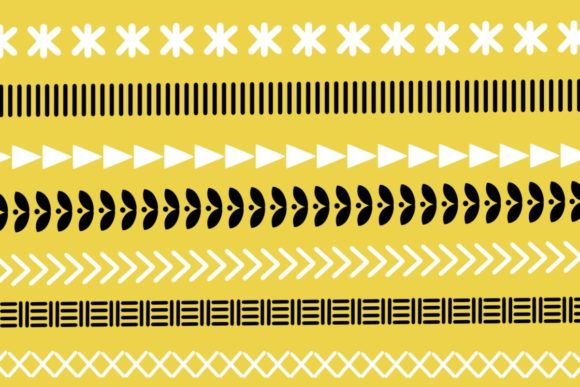
Comic artists know that messy lettering can ruin an otherwise stunning page. A Procreate Ruler Template provides the straight edges needed for crisp speech bubbles and panel borders. By using the included Madara Grid stamps or dashed line brushes, artists can create uniform panel structures that guide the reader’s eye naturally. The transparency of these digital rulers allows artists to see their underlying pencil sketches while ensuring the final ink lines are perfectly aligned.
Understanding the Bundle: More Than Just Lines
When selecting a resource like this, it is important to understand what constitutes a comprehensive package. A high-quality bundle does not just offer a single image; it provides versatility. For instance, a robust collection includes multiple formats to suit various canvas sizes and zoom levels. Having access to 12 different formats means you can choose a ruler that fits your specific workflow, whether you are working on a small icon or a large poster.
The inclusion of Procreate brushes significantly enhances the value. Standard rulers are static, but brushes like dot grids, dot lines, and dashed lines allow for dynamic construction lines that can be easily erased or hidden later. These Madara Grid stamps and guide brushes serve as temporary scaffolding for your artwork. They help you map out perspective points or align elements before you commit to final colors and details. This layer of flexibility is crucial for maintaining a clean workflow.
Practical Considerations Before You Start
Before integrating a Procreate Ruler Template into your daily routine, consider your device and software compatibility. These tools are designed specifically for the Procreate app on iPad. They rely on the app’s specific file handling and brush engine. If you are using alternative software like Photoshop on desktop or Procreate Pocket on iPhone, the functionality may differ, or the files may not import correctly. Always ensure you are working within the supported environment to avoid frustration.
Another key consideration is organization. Since these templates often come as PNG files or brush sets, keeping your library organized is essential. Creating a dedicated folder for "Guides" or "Templates" within your Procreate imports ensures you can access them quickly. The instant download format, typically a ZIP file containing folders for rulers and brushes, requires a quick unzip process on your iPad. Once extracted, importing them into Procreate is straightforward, but taking the time to set up your workspace initially saves hours of searching later.
How to Integrate Rulers into Your Workflow
Using these tools effectively involves a simple but powerful workflow. First, import the PNG ruler images into your canvas. Because they are images, you can use the transform tool to scale, rotate, and position them exactly where needed. This flexibility is superior to fixed grid settings because you can move the ruler to any part of the canvas without affecting the entire background.
Next, utilize the custom brushes for construction lines. If you need to draw a series of parallel lines, select the dashed line brush from the provided set. This allows you to sketch guidelines that are visually distinct from your final artwork. When you are ready to finalize your piece, simply hide the ruler layer and erase the guide brushes. This non-destructive approach keeps your original sketch intact while providing the precision of a technical drawing tool.
The Value of Specialized Tools
In a digital landscape saturated with generic assets, specialized tools like the Procreate Ruler Template stand out because they solve specific pain points. They address the difficulty of scaling and alignment that many users face when transitioning from traditional media, where physical rulers are standard, to digital platforms. By providing a familiar, tactile-like experience, these templates reduce the learning curve and increase productivity.
Furthermore, the inclusion of free brushes and stamps adds significant value. It transforms a simple utility into a comprehensive toolkit. Whether you are a student learning perspective, a professional architect drafting concepts, or a hobbyist trying to improve their lettering, having the right guides can make the difference between a rough sketch and a polished presentation. The ability to instantly download and implement these tools means you can start improving your artwork immediately, without waiting for software updates or complex installations.
Ultimately, the goal is to remove barriers between your idea and its execution. By leveraging a well-designed Procreate Ruler Template, you gain control over your canvas, ensuring that every line, shape, and text element sits exactly where it should. This precision empowers you to focus on creativity rather than correction, making your digital art journey smoother and more enjoyable.