Mastering Natural Textures with Leaf Shadows Procreate Brushes
Digital illustration has come a long way from flat colors and rigid lines. Today, the most compelling artwork often relies on texture, depth, and the subtle imperfections found in nature. This is where specialized tools like Leaf Shadows Procreate Brushes become indispensable for modern creators. Whether you are designing a summer packaging label, illustrating a children’s book about the jungle, or simply adding a touch of organic warmth to your social media graphics, these brushes bridge the gap between digital precision and natural chaos.
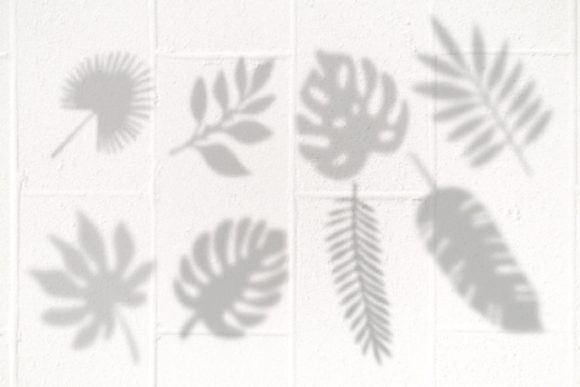
The appeal of leaf shadow textures lies in their versatility. They are not just for botanical illustrations. These tools allow artists to simulate the dappled light that filters through a canopy, creating an immediate sense of atmosphere and time of day. By integrating these eight specific brush strokes into your workflow, you can elevate standard designs into immersive visual experiences without spending hours painting individual leaves by hand.
Why Texture Matters in Digital Design
In a world saturated with polished, vector-perfect graphics, audiences crave authenticity. A flat background can feel sterile, but overlaying it with the soft, irregular patterns of foliage changes the entire mood of a piece. Leaf Shadows Procreate Brushes provide a shortcut to this complexity. They mimic the way light interacts with physical objects, adding a layer of realism that resonates with viewers on a subconscious level.
For marketers and small business owners, this distinction is crucial. Consider a skincare brand launching a new organic serum. The product photography might be clean, but the accompanying social media posts benefit from earthy, natural elements. Using leaf shadows can suggest freshness, purity, and connection to nature without needing a costly photoshoot in a forest. It is a practical solution for entrepreneurs who need high-quality visuals on a tight budget and timeline.
Real-World Applications for Creators and Professionals
The utility of these brushes extends far beyond hobbyist sketching. Here is how different professionals can leverage this toolkit in their daily workflows.
Graphic Design and Branding
Designers often struggle to make digital layouts feel tactile. When creating invitations for a garden wedding or menus for a farm-to-table restaurant, the context demands an organic feel. Instead of searching for stock photos that may not match your color palette, you can paint custom shadow overlays directly onto your canvas. This ensures that the lighting direction matches your other elements, creating a cohesive look. The Procreate Brushstrokes included in this set are optimized for pressure sensitivity, allowing you to control the opacity and density of the shadow with your Apple Pencil.
Children’s Book Illustration
Illustrators working on stories set in outdoor environments know how time-consuming it is to render forests. These brushes allow you to block in large areas of dappled light quickly. You can establish the mood of a scene—whether it is a bright, sunny afternoon or a mysterious, dim twilight—by adjusting the blend mode of the shadow layer. This speeds up the initial drafting phase significantly, giving you more time to focus on character expressions and narrative details.
Educational Content and E-Learning
Educators and instructional designers can use these assets to make digital worksheets and presentations more engaging. A biology lesson on photosynthesis becomes more visually appealing when the background features realistic leaf patterns rather than plain white space. It helps maintain student attention and reinforces the subject matter through visual context. For online course creators, these subtle design touches can make slide decks feel more professional and less like generic templates.
Technical Integration and Workflow Tips
To get the most out of this resource, it is important to understand the technical requirements. These files are formatted specifically for Procreate on iOS and iPadOS. This means you will need an iPad and the Procreate app to access and use the .brushset file. Once imported, the brushes appear in your library, ready for immediate use.
One common mistake beginners make is using these brushes at full opacity on a new layer. For a realistic effect, try setting the layer blend mode to "Multiply" or "Overlay." This allows the shadow to interact with the colors beneath it, darkening them naturally rather than just sitting on top like a sticker. Experiment with the flow and opacity settings in the brush studio to fine-tune the intensity. Since every project has different lighting conditions, there is no one-size-fits-all setting. The key is to observe real-life references and mimic how light behaves in those scenarios.
Combining with Other Elements
These eight brushes are designed to work harmoniously with other digital assets. You might pair them with watercolor textures for a soft, artistic look, or with sharp vector icons for a modern, mixed-media aesthetic. The contrast between the organic, irregular edges of the leaf shadows and the clean lines of typography can create a striking visual hierarchy. This technique is particularly effective in poster design and editorial layouts where you want to guide the viewer’s eye through the composition.
Considerations Before You Start
While these tools are powerful, they are not a magic fix for poor composition. Before downloading or purchasing, consider your specific project needs. Ask yourself: Does this design actually benefit from added texture? Sometimes, less is more. Overusing shadow effects can clutter a design and make text hard to read. Always prioritize legibility and clarity, especially in commercial applications.
Additionally, think about your hardware. While Procreate runs on various iPad models, larger screens like the iPad Pro offer more room for detailed work and better pressure sensitivity ranges. If you are using an older device, you may need to adjust your workflow to accommodate slight lag or lower resolution limits. However, for most standard illustration tasks, even entry-level iPads handle these brushes smoothly.
It is also worth noting that while these brushes save time, they require a basic understanding of digital layering. If you are new to Procreate, take some time to learn about layer masks and clipping masks. These features allow you to restrict the leaf shadows to specific areas, such as inside a letterform or within a defined shape, giving you precise control over the final output.
Enhancing Your Creative Toolkit
Investing in specialized brushes like Leaf Shadows Procreate Brushes is about expanding your creative vocabulary. It allows you to communicate ideas more effectively and efficiently. For freelancers, this efficiency translates directly to profitability. Being able to produce high-quality, textured backgrounds in minutes rather than hours means you can take on more projects or spend more time refining the core concepts.
For hobbyists, it opens up new avenues for expression. You might find yourself experimenting with digital journaling, creating seasonal greeting cards, or designing custom wallpapers for your devices. The joy of creation is often found in the discovery of new techniques, and these brushes provide a playful yet professional way to explore natural themes.
Ultimately, the value of this toolset lies in its ability to bring the outdoors in. In an increasingly digital lives, there is a profound comfort in seeing elements of nature reflected in our art and design. Whether you are building a brand identity, teaching a class, or just doodling for fun, these leaf shadows offer a simple, elegant way to add depth, warmth, and life to your work. By mastering these eight brushes, you equip yourself with a versatile asset that can adapt to countless creative challenges, ensuring your designs remain fresh, relevant, and visually captivating.