Summer Beach Stamps Brush: A Practical Guide for Digital Creators and Planners
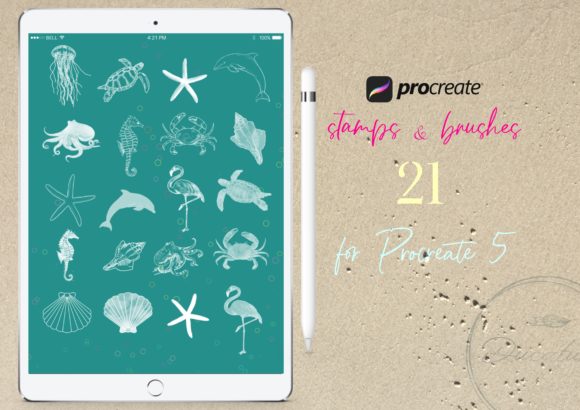
Digital illustration has evolved from a niche hobby into a robust ecosystem of tools that cater to specific artistic needs. Among the vast array of resources available, themed brush sets have become essential for creators who value efficiency without sacrificing aesthetic quality. The Summer Beach Stamps Brush set represents a specialized category of digital assets designed to streamline the creation of coastal and oceanic imagery. This collection, which includes 21 Procreate stamp brushes, offers a targeted solution for artists, planners, and designers looking to incorporate seaside elements into their work quickly.
Understanding whether this specific toolset aligns with your workflow requires an evaluation of its features, compatibility, and intended use cases. Unlike general-purpose painting brushes, stamp brushes serve a different function in the digital artist’s toolkit. They are pre-designed shapes or illustrations that can be placed onto the canvas with a single tap or stroke. This article explores the utility of the Summer Beach Stamps Brush, compares it to alternative methods of creating similar artwork, and helps you determine if it is the right resource for your creative projects.
Understanding the Functionality of Stamp Brushes
To appreciate the value of the Summer Beach Stamps Brush, it is important to distinguish between standard painting brushes and stamp brushes within the Procreate environment. Standard brushes simulate traditional media like pencils, oils, or watercolors, requiring the user to build form and texture through manual strokes. In contrast, stamp brushes are essentially single-stroke images. When you press the Apple Pencil to the screen, the brush deposits a complete graphic—such as a seashell, a wave, or a palm leaf—rather than a textured line.
The Summer Beach Stamps Brush set leverages this technology to provide 21 high-quality digital stamps. These are not merely low-resolution clipart; they are engineered to interact with Procreate’s pressure sensitivity and tilt features, allowing for dynamic sizing and opacity control. This distinction is crucial for users who may be accustomed to importing static PNG files. With stamp brushes, the workflow is non-destructive and integrated directly into the drawing process, offering a level of flexibility that static images cannot match.
Comparing Stamp Brushes to Manual Illustration and Static Clipart
When deciding whether to invest in a specialized brush set like Summer Beach Stamps Brush, creators often weigh three primary approaches: manual illustration, using static clipart, and utilizing stamp brushes. Each method has distinct tradeoffs regarding time, skill requirement, and customization.
Manual Illustration offers the highest degree of creative control. An experienced artist can draw a unique seashell or wave from scratch, ensuring it fits the exact perspective and lighting of their composition. However, this approach is time-intensive. For projects such as digital planners, greeting cards, or invitations where multiple elements are needed, drawing every component manually can be prohibitive. The Summer Beach Stamps Brush serves as a middle ground, providing professionally designed elements that save hours of drafting time while still allowing for artistic arrangement.
Static Clipart (PNGs) is another common alternative. Many creators purchase bundles of transparent background images to drag and drop into their projects. While this is efficient, it lacks the seamless integration of Procreate brushes. Static images must be managed as separate layers, resized manually, and often require additional adjustments to match the color palette of the artwork. Stamp brushes, by contrast, behave like any other tool in the brush library. You can change their color instantly using the active color swatch, adjust their size on the fly with pressure, and blend them into the canvas using Procreate’s layer modes. This integration makes the Summer Beach Stamps Brush a more fluid option for complex compositions.
Evaluating Compatibility and Technical Requirements
A critical factor in adopting any digital tool is technical compatibility. The Summer Beach Stamps Brush set is designed exclusively for the Procreate app on iPad. This specificity is both a strength and a limitation. For users already embedded in the Apple ecosystem, particularly those with an iPad Pro or standard iPad paired with an Apple Pencil, the integration is seamless. The brushes leverage the hardware’s pressure sensitivity, meaning that a lighter touch creates a smaller, fainter stamp, while a firmer press yields a larger, more opaque image. This feature adds a natural, organic feel to digital collages, mimicking the variability of hand-placed physical stamps.
However, this exclusivity means the brushes are not compatible with Android tablets, desktop software like Photoshop or Illustrator, or other iOS drawing apps such as ArtSet or Adobe Fresco. Users must ensure they are running Procreate Version 5.0 or higher, as older versions may not support the specific file formats or engine optimizations used in modern brush sets. Additionally, the requirement for a pressure-sensitive pen is non-negotiable. Without an Apple Pencil or a compatible third-party stylus that supports pressure data, the core functionality of the stamp brushes—dynamic sizing and opacity—will be lost, reducing them to static, uniform stamps.
Practical Use Cases and Creative Applications
The versatility of the Summer Beach Stamps Brush extends beyond simple illustration. Its design makes it particularly suitable for several specific creative industries and hobbies.
- Digital Planning and Journaling: Users of digital planners often seek thematic elements to decorate weekly spreads or monthly covers. The beach theme provides a calming, seasonal aesthetic that can enhance the visual appeal of productivity tools without overwhelming the functional layout.
- Greeting Cards and Invitations: For designers creating summer-themed wedding invitations, birthday cards, or vacation announcements, these stamps offer quick decorative accents. Instead of sourcing individual icons, designers can scatter shells and waves across the canvas to create borders or background textures.
- Social Media Content: Content creators who produce lifestyle or travel-related posts can use these brushes to add cohesive graphical elements to their photos or text overlays. The consistent style of the 21 brushes ensures a professional, branded look across multiple posts.
- Educational Materials: Teachers and parents creating digital worksheets or storybooks about marine life or summer activities can use these stamps to illustrate concepts quickly. The clear, recognizable shapes are ideal for engaging younger audiences.
In each of these scenarios, the value proposition lies in speed and consistency. The Summer Beach Stamps Brush allows users to maintain a coherent visual style without needing advanced illustration skills for every element.
Limitations and Considerations for Potential Users
While the Summer Beach Stamps Brush offers significant advantages, it is not a universal solution. Creators should be aware of certain limitations before purchasing. First, the set contains 21 specific designs. While this is a reasonable number for a themed pack, users requiring a vast variety of marine life—such as specific fish species, detailed coral reefs, or underwater scenes—may find the selection limited. In such cases, a larger, more comprehensive marine asset library might be more appropriate.
Second, the "stamp" nature of the brushes means they are pre-defined shapes. If a user needs a seashell from a specific angle that is not included in the set, they cannot rotate the brush tip dynamically in the same way they might rotate a custom shape in vector software. While Procreate allows for layer rotation after placement, the initial stamp is fixed. Users who require precise anatomical accuracy or highly customized perspectives may need to supplement these brushes with manual drawing or 3D reference models.
Finally, the learning curve for installing and optimizing brush sets should not be underestimated. Although an installation guide is provided, users new to Procreate may need time to understand how to organize their brush library, adjust streamlines, or modify brush settings to suit their personal preferences. The effectiveness of the Summer Beach Stamps Brush depends largely on the user’s willingness to engage with the software’s customization options.
Making an Informed Decision
Choosing the right digital resources is a balance between cost, convenience, and creative control. The Summer Beach Stamps Brush is an excellent choice for iPad-based creators who prioritize workflow efficiency and thematic consistency. It is particularly well-suited for those who create frequent, seasonal content or who enjoy the tactile experience of digital stamping. If you already use Procreate for planning, card making, or casual illustration, this set integrates naturally into your existing toolkit.
However, if you work primarily on desktop platforms, require vector scalability, or need highly specific, customizable marine illustrations, you may benefit more from general-purpose illustration tools or extensive clipart libraries. Ultimately, the Summer Beach Stamps Brush serves as a specialized enhancer rather than a replacement for fundamental artistic skills. By understanding its role as a time-saving, stylistic tool, you can better evaluate whether it fits into your broader creative strategy.