Photoshop Gold Paint Mixture Brushes: A Practical Evaluation for Digital Artists
In the realm of digital design, achieving the tactile realism of traditional media remains a persistent challenge. Designers often seek tools that bridge the gap between flat digital pixels and the organic texture of physical paint. Photoshop Gold Paint Mixture Brushes represent a specialized solution aimed at replicating the luxurious appearance of thick, glitter-infused gold paint. This article evaluates the functionality, aesthetic potential, and practical considerations of this specific brush set to help designers determine if it aligns with their creative workflow.
Understanding the Toolset
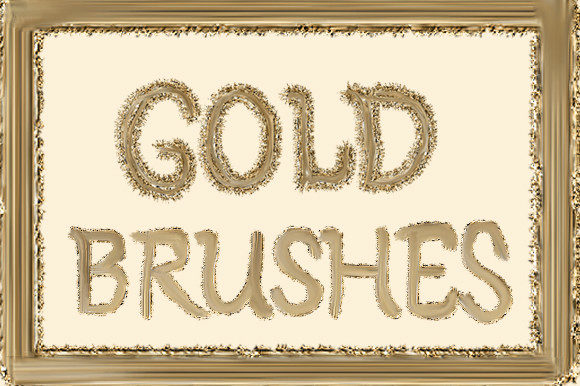
The core offering is a collection of six distinct brushes packaged in a standard .ABR file format, compatible with Adobe Photoshop. Unlike standard digital brushes that rely solely on opacity and flow settings to simulate depth, these brushes are engineered to mimic the viscosity and light-reflection properties of heavy-body acrylics mixed with metallic pigments. The primary visual characteristic is a "pretty stroke" that emulates the uneven, textured application of real paint.
A critical technical aspect of this product is its reliance on external textures. The brushes do not contain static color data; instead, they utilize a dynamic mapping system that pulls from a loaded gold glitter texture. This means the visual output is directly dependent on the underlying texture file. To alter the hue or metallic finish, users must load different glitter textures into their workspace. This modular approach offers flexibility but introduces an additional step in the setup process compared to all-in-one brush presets.
Aesthetic Appeal and Use Cases
The primary value proposition of these brushes lies in their ability to add immediate visual weight and luxury to digital compositions. The "thick and heavy" paint effect creates a sense of dimensionality that flat colors cannot achieve. This makes the tool particularly effective for specific design niches:
- Typography: Applying these brushes to lettering can transform standard fonts into ornate, hand-painted headlines. The irregular edges and glitter dispersion add a human touch to digital text, making it ideal for invitations, posters, and branding elements.
- Social Media Content: In a saturated digital landscape, textures that catch the eye are valuable. The high-contrast sparkle of gold glitter performs well on platforms like Instagram and Pinterest, where visual stoppower is crucial for engagement.
- Feminine Product Design: The aesthetic aligns closely with markets focused on beauty, fashion, and lifestyle products. The combination of gold and glitter conveys elegance and premium quality, which can enhance mockups for packaging, labels, and promotional materials.
Benefits and Advantages
One significant advantage of using Photoshop Gold Paint Mixture Brushes is time efficiency. Creating realistic metallic paint effects from scratch requires advanced knowledge of layer styles, blending modes, and custom texture creation. This brush set consolidates those techniques into a single tool, allowing designers to achieve complex results with minimal effort. The pre-configured dynamics handle the distribution of glitter particles, ensuring a natural-looking scatter that mimics physical randomness.
Furthermore, the separation of brush dynamics from color texture provides a degree of customization. While the default gold texture is the primary selling point, the ability to swap textures means the brush engine itself is versatile. Designers who already possess a library of metallic or glitter textures can potentially adapt these brushes for silver, rose gold, or copper effects, provided they understand how to map the new textures correctly.
Tradeoffs and Technical Considerations
Despite their aesthetic benefits, there are notable tradeoffs to consider. The most significant limitation is the dependency on external texture files. As noted in the product description, changing the paint color requires loading a different glitter texture. For users unfamiliar with Photoshop’s texture loading protocols, this may present a learning curve. It is not a "click-and-go" solution for color changes; it requires an understanding of how brush settings interact with pattern overlays or texture maps.
Additionally, the specificity of the "gold glitter" aesthetic limits its universal application. These brushes are not suitable for projects requiring matte finishes, subtle gradients, or non-metallic tones. They are a niche tool rather than a general-purpose painting kit. Designers working on minimalist or corporate projects may find the heavy texture distracting or inappropriate for the brand voice.
Performance is another consideration. High-resolution textures combined with complex brush dynamics can increase file size and potentially slow down performance on older hardware. Users should ensure their systems can handle the rendering load, especially when working on large canvases for print media.
Evaluating Fit: Is This Right for You?
To determine if this brush set is a worthwhile investment, consider your current project requirements and technical comfort level. This tool is a strong fit if:
- You frequently design for industries that value luxury aesthetics, such as beauty, weddings, or high-end retail.
- You need to produce textured typography quickly without manually painting each letter.
- You are comfortable managing external assets and adjusting Photoshop brush settings.
- You already have access to or are willing to purchase additional metallic texture packs to expand the color range.
Conversely, alternatives may be worth considering if:
- You require a broad palette of colors out of the box without additional purchases.
- Your design style leans towards flat design, minimalism, or vector-based graphics.
- You prefer brushes that include built-in color variation without needing to source separate texture files.
- You are a beginner seeking a simple, single-click solution for all painting needs.
Practical Decision-Making Insights
When evaluating Photoshop Gold Paint Mixture Brushes, it is essential to view them as part of a broader toolkit rather than a standalone solution. The value is maximized when combined with a robust library of textures. If you decide to proceed, consider bundling the brush purchase with a compatible metallic glitter texture pack to ensure immediate usability across different color schemes.
Test the brushes on a small scale before committing to large projects. Pay attention to how the glitter texture scales with brush size. In some digital brush engines, textures can appear pixelated if scaled too large or lose definition if scaled too small. Adjusting the spacing and scattering settings in the Brush Panel can help mitigate these issues and tailor the effect to your specific canvas resolution.
Ultimately, the decision hinges on the balance between convenience and customization. These brushes offer a high-quality, realistic effect that saves time on texture creation but requires manual intervention for color variation. For designers specializing in glamorous, textured visuals, this tradeoff is often worth the investment. For generalists, the niche nature of the tool may limit its long-term utility.
In conclusion, Photoshop Gold Paint Mixture Brushes serve a specific but valuable role in digital design. They provide an efficient pathway to achieving luxurious, tactile gold effects that resonate with modern aesthetic trends. By understanding the technical requirements and aesthetic limitations, designers can make an informed choice about whether this tool enhances their creative capabilities or if a more versatile brush set better serves their diverse needs.