Free Procreate Brushes Seamless Patterns: A Practical Guide to Digital Texturing
In the evolving landscape of digital illustration, efficiency often dictates the quality and volume of work an artist can produce. For iPad users relying on the Procreate ecosystem, Free Procreate Brushes Seamless Patterns represent a significant shift in how backgrounds, textiles, and surface details are approached. Rather than manually painting repetitive elements—a task that is both time-consuming and prone to human error—artists can now leverage specialized brush sets to generate complex, tileable designs instantly. This article explores the utility, limitations, and strategic applications of a specific bundle containing 15 brushes, including 12 seamless patterns and 3 seamless textures, to help you determine if this tool fits your creative workflow.
Understanding the Mechanics of Seamless Pattern Brushes
To appreciate the value of Free Procreate Brushes Seamless Patterns, one must first understand the technical distinction between a standard stamp brush and a seamless pattern brush. A standard brush places a static image on the canvas. In contrast, a seamless pattern brush is engineered to tile infinitely without visible edges or breaks. When you drag the stylus across the screen, the brush engine calculates the repetition in real-time, creating a continuous fabric-like effect.
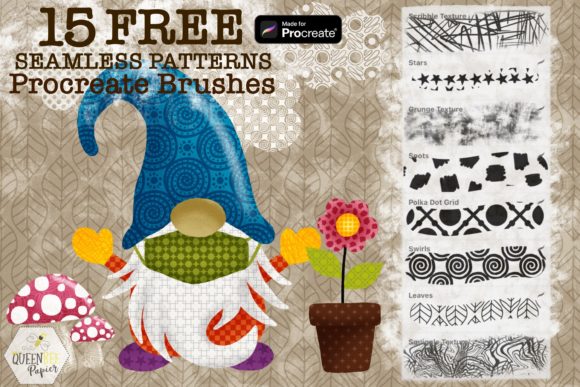
The specific set under review includes 12 seamless pattern brushes featuring geometric and organic motifs such as swirls, polka dots, stars, spots, flowers, checkers, squares, and leaves. Additionally, it provides 3 seamless texture brushes characterized by scribbles, squiggles, and grunge effects. This combination allows for a layered approach to design. For instance, an artist might use a checkerboard pattern as a base and overlay a grunge texture to simulate wear and tear, all within a single stroke.
Comparative Analysis: Custom Creation vs. Pre-made Brush Sets
When evaluating whether to adopt Free Procreate Brushes Seamless Patterns, it is essential to compare them against the two primary alternatives: manual pattern creation and third-party asset libraries.
Manual Creation
Creating seamless patterns from scratch in Procreate involves drawing a motif, using the "Offset" filter to check for seams, repairing the edges, and then defining it as a source. While this method offers total creative control, it is labor-intensive. For professionals working on tight deadlines, such as greeting card designers or textile printers, the time investment may not be justified for every project. The brush set eliminates this setup phase, allowing for immediate experimentation.
Third-Party Asset Libraries
Many artists rely on importing PNG images into their gallery to use as fill layers. While effective, this approach lacks the dynamic flexibility of a brush. With a brush, you can adjust the size, rotation, and spacing on the fly. The Free Procreate Brushes Seamless Patterns set integrates directly into the brush engine, meaning you can alter the scale of a polka dot or the density of a leaf pattern using the same sliders you use for opacity and flow. This interactivity is a distinct advantage over static image assets.
Evaluating the Bundle: Strengths and Limitations
This particular bundle offers a focused selection of tools. Understanding its scope helps manage expectations regarding its utility in professional workflows.
Strengths
- Versatility through Blend Modes: The true power of these brushes emerges when combined with Procreate’s layer blend modes. A simple black-and-white checker pattern can become a subtle shadow map when set to "Multiply," or a highlight overlay when set to "Screen." This transforms basic geometric shapes into sophisticated lighting tools.
- Instant Download and Accessibility: As a digital product, the barrier to entry is low. The package contains a single ZIP file with a .brushset file, ensuring a straightforward installation process without physical shipping delays.
- Diverse Motif Range: The inclusion of both rigid geometrics (squares, checkers) and organic forms (flowers, leaves, squiggles) covers a broad spectrum of design needs, from modern minimalist layouts to whimsical children’s illustrations.
Limitations and Tradeoffs
It is crucial to note that Procreate brushes are compatible with Procreate only. These files will not function in Adobe Photoshop, Clip Studio Paint, or any other desktop-based software. If your workflow involves moving between an iPad and a desktop computer, you will need to rasterize the layers or export the patterns as images before transferring them, which reduces editability.
Furthermore, while the set includes 15 brushes, it is a curated collection rather than an exhaustive library. Artists seeking highly specific cultural patterns or complex photorealistic textures may find the geometric and hand-drawn aesthetic limiting. However, for adding an element of fun and playfulness to digital art projects, the provided variety is robust.
Technical Requirements and Compatibility
Before downloading, ensure your hardware meets the necessary specifications. The brushes require:
- An iPad Pro or a compatible iPad model that supports the latest version of Procreate.
- An Apple Pencil or a compatible, pressure-sensitive stylus. While finger painting is possible in Procreate, the precision required to manipulate pattern scales and rotations is significantly enhanced by a stylus.
- The Procreate App. These brushes DO NOT work in Photoshop or any other application.
The installation process is streamlined: download the ZIP file, extract the .brushset file, and import it directly into your Procreate brush library. This ease of integration is a key benefit for users who frequently update their toolkits.
Practical Applications and Workflow Integration
To maximize the value of Free Procreate Brushes Seamless Patterns, consider integrating them into specific stages of your design process.
Background Generation
Instead of spending hours painting a backdrop, use the star or swirl patterns to create dynamic skies or abstract backgrounds. By adjusting the opacity and using a soft eraser, you can fade these patterns into the distance, creating depth without complex perspective drawing.
Textile and Surface Design
For artists designing digital fabrics, the seamless nature of these brushes is invaluable. The leaf and flower patterns can simulate floral prints, while the checkers and squares mimic woven fabrics. Experimenting with different colors allows for rapid prototyping of colorways. You can test a red-and-white gingham versus a blue-and-white variant in seconds by simply changing the layer color.
Texture Overlay for Depth
The three included texture brushes—scribbles, squiggles, and grunge—are particularly effective for breaking up flat digital colors. Applying a grunge texture over a solid color block and setting the blend mode to "Overlay" adds a tactile, hand-made feel to digital illustrations. This technique is widely used in editorial illustration to soften the sterile look of vector-style art.
Decision Factors: Is This Set Right for You?
Choosing the right resources depends on your specific artistic goals. Free Procreate Brushes Seamless Patterns are an ideal choice if:
- You primarily work within the Procreate ecosystem on an iPad.
- You need to speed up the creation of backgrounds, textiles, or decorative borders.
- You enjoy experimenting with blend modes and layering to create unique composite effects.
- You prefer a playful, hand-drawn aesthetic over photorealistic precision.
Conversely, you may need to explore alternative options if:
- Your workflow relies heavily on desktop software like Photoshop or Illustrator.
- You require highly customized, non-repeating motifs that cannot be achieved through tiling.
- You are looking for complex, multi-layered smart objects that retain editability outside of Procreate.
Conclusion
The Free Procreate Brushes Seamless Patterns set, comprising 12 patterns and 3 textures, offers a practical solution for iPad artists seeking to enhance their efficiency and creative range. By leveraging the seamless tiling capability and the flexibility of Procreate’s brush engine, users can transform simple geometric and organic shapes into complex, layered designs. While the limitation to the Procreate platform restricts cross-software compatibility, the benefits for iPad-centric workflows are clear. Whether you are designing textiles, creating engaging backgrounds, or adding textural depth to your illustrations, this bundle provides a versatile toolkit for adding fun and unique elements to your digital art. Happy creating.