Integrating 115 Vector Brushes into Professional Design Workflows
In the fast-paced environment of digital design, efficiency often dictates the quality and volume of output. For graphic designers, illustrators, and creative entrepreneurs, the ability to rapidly prototype ideas while maintaining high visual fidelity is a critical skill. This is where specialized assets like 115 Vector Brushes become more than just a download; they become an integral component of a streamlined creative pipeline. This collection offers a curated set of hand-drawn strokes that bridge the gap between organic, artistic expression and the precision required in vector-based workflows.
Understanding how to effectively integrate these brushes into your existing toolkit requires looking beyond the aesthetic appeal. It involves analyzing how they fit into the broader context of project planning, execution, and final delivery. Whether you are working on branding materials, editorial illustrations, or marketing assets, the strategic use of pre-made, high-quality vector brushes can significantly reduce production time without compromising on uniqueness.
The Role of Hand-Drawn Textures in Digital Precision
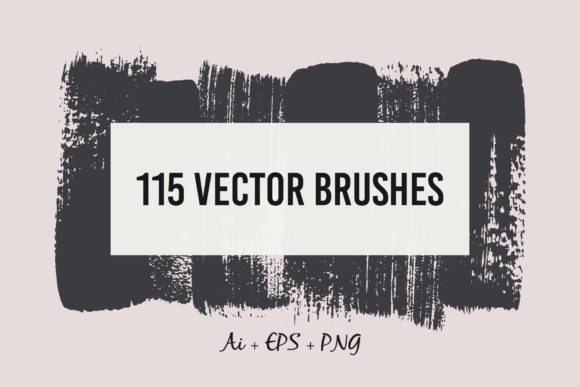
Vector graphics are renowned for their scalability and clean lines, but they can sometimes lack the warmth and character associated with traditional media. The 115 Vector Brushes collection addresses this limitation by providing detailed and realistic textures that were originally drawn by hand. Each stroke was carefully picked, scanned, and transformed into a fully editable brush format. This process ensures that the imperfections and nuances of human handwriting are preserved, adding a layer of authenticity to digital compositions.
For professionals, this means you do not have to choose between the flexibility of vectors and the organic feel of ink or charcoal. You get both. The brushes allow for the creation of complex, textured designs that remain crisp at any size. This is particularly valuable for projects that require a bespoke, artisanal look, such as packaging design, wedding invitations, or boutique branding. By incorporating these elements early in the design phase, creators can establish a distinct visual language that sets their work apart from generic template-based designs.
Workflow Integration: From Concept to Final Export
Implementing new assets into a workflow should be seamless. The 115 Vector Brushes are designed with usability in mind, ensuring that they can be dropped into various stages of the creative process. Here is how they interact with typical design tasks:
- Ideation and Sketching: During the initial brainstorming phase, these brushes can be used to create quick mood boards or concept sketches. The variety of strokes allows for rapid exploration of different styles, helping to define the direction of a project before committing to detailed vector paths.
- Layering and Depth: In the execution phase, the brushes serve as excellent tools for adding depth. By layering different strokes, designers can create shadows, highlights, and textural backgrounds that give flat designs a three-dimensional feel. This is crucial for creating engaging social media graphics or web banners that need to capture attention quickly.
- Final Polish and Consistency: Towards the end of a project, consistency is key. Using a unified set of brushes ensures that all elements of a design share a common visual thread. This helps in maintaining brand consistency across multiple deliverables, such as business cards, letterheads, and digital ads.
The inclusion of an Ai brush library means that installation is straightforward for Adobe Illustrator users. Once installed, the brushes appear in the brush panel, ready for immediate use. This ease of access reduces friction in the workflow, allowing designers to stay in a state of flow rather than getting bogged down in technical setup.
Technical Compatibility and File Management
A major concern when adopting new digital assets is compatibility. The 115 Vector Brushes collection is provided in multiple formats to ensure broad usability and long-term viability. The primary file is an Ai file, which is native to Adobe Illustrator. This format preserves the editability of the brushes, allowing users to adjust stroke weight, color, and opacity as needed. For those who may not use Illustrator as their primary tool, or who need to share assets with clients or team members using different software, the collection also includes an EPS10 file.
The EPS10 format is a standard vector format that is widely supported across various design applications. This ensures that the strokes can be imported into other vector-based programs, maintaining their scalability and quality. Additionally, the inclusion of 116 PNG files with transparent backgrounds provides a rasterized option for quick use in non-vector environments, such as web design tools or presentation software. These PNGs are high-resolution (2000x1200px), ensuring they look sharp on modern displays.
From a file management perspective, having all these formats in one package simplifies organization. Designers can archive the entire collection knowing they have backups in multiple formats. This is particularly useful for agencies or freelancers who may need to hand off files to printers or developers who have specific format requirements.
Practical Tips for Maximizing Utility
To get the most out of the 115 Vector Brushes, consider the following practical implementation strategies:
- Create Custom Swatches: Pair the brushes with a predefined color palette. By saving specific color combinations as swatches, you can quickly apply consistent styling to your brush strokes. This is especially effective for branding projects where color accuracy is paramount.
- Experiment with Opacity and Blending Modes: Do not limit yourself to solid colors. Try lowering the opacity of the brushes or using blending modes like Multiply or Overlay to create subtle texture effects. This can add sophistication to background elements or overlays.
- Combine with Typography: Use the brushes to accentuate typography. Underlines, cross-outs, or circular frames created with these brushes can draw attention to key headlines or calls to action. The hand-drawn nature of the strokes contrasts nicely with clean, sans-serif fonts, creating a dynamic visual hierarchy.
- Build a Personal Library: Over time, identify the brushes you use most frequently and save them as favorites or create custom brush sets. This personalization speeds up future projects by reducing the time spent searching through the full library.
It is important to note that you will need Adobe Illustrator to use the native brush functionality. While the EPS and PNG files offer flexibility, the true power of editable, scalable strokes is unlocked within the Illustrator environment. Ensuring your software is up to date will guarantee the best performance and compatibility with the Ai file.
Long-Term Value and Return on Investment
When evaluating design assets, it is essential to consider their long-term value. The 115 Vector Brushes are not a one-time use item; they are a reusable resource that can be applied across countless projects. For freelancers and small business owners, this represents a significant return on investment. Instead of spending hours drawing custom textures for each client, you can leverage this library to deliver high-quality results in a fraction of the time.
Moreover, the timeless nature of hand-drawn textures means these brushes are less likely to go out of style compared to trendy digital effects. They provide a classic, authentic look that resonates with audiences seeking genuine connection. This makes them a safe and versatile addition to any designer’s toolkit, suitable for both contemporary and traditional design aesthetics.
In conclusion, the 115 Vector Brushes collection is a practical, high-quality resource that enhances the efficiency and creativity of digital design workflows. By understanding how to integrate these tools into your process, from initial concept to final export, you can elevate the quality of your work while saving valuable time. Whether you are a seasoned professional or a hobbyist looking to improve your craft, these brushes offer a reliable way to add organic texture and character to your vector projects.