Character Pose Brush Kit- Male Edition: Streamlining Digital Character Design
For digital artists, illustrators, and concept designers, the initial stages of character creation often present the most significant friction. Sketching accurate anatomy from scratch, ensuring correct perspective, and maintaining consistent proportions can consume hours of valuable production time. This is where specialized tools like the Character Pose Brush Kit- Male Edition become essential assets in a modern creative workflow. Rather than serving as a replacement for artistic skill, this kit functions as a structural foundation, allowing creators to bypass the tedious groundwork of basic anatomy and focus immediately on expression, costume design, and narrative posture.
Integrating a pose brush kit into your routine is not merely about speeding up drawing; it is about standardizing quality and reducing cognitive load. Whether you are working on a tight deadline for a client, developing a comic series, or iterating through multiple character concepts for a game, having a reliable library of anatomical stamps ensures that every figure starts from a place of structural integrity. The Character pose brush kit Photoshop and Procreate brushes Male edition is designed specifically to bridge the gap between rough ideation and polished illustration, making character design and posing a breeze for professionals and hobbyists alike.
Understanding the Components and Workflow Integration
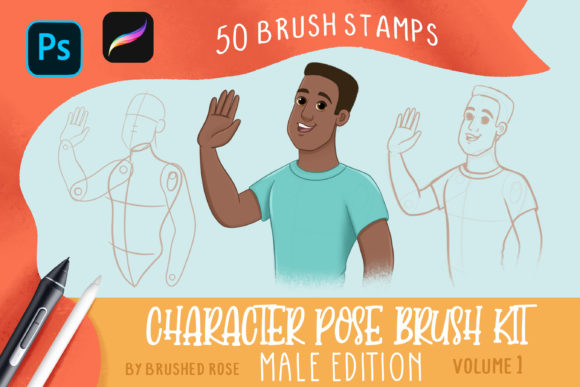
To effectively utilize this tool, one must first understand its composition. The kit is not a single monolithic brush but a modular system comprising 50 distinct brush stamps. This modularity is key to its flexibility. Instead of forcing a pre-made full-body pose onto your canvas, which might not fit your specific perspective or composition, the kit allows you to build characters piece by piece. The breakdown includes:
- 12 Head Stamps: Providing various angles and basic shapes to establish identity and gaze direction.
- 6 Arm Stamps: Covering primary positions such as relaxed, raised, or extended states.
- 8 Hand Stamps: Offering essential gestures like fists, open palms, and pointing fingers, which are notoriously difficult to draw freehand.
- 9 Torso Stamps: Establishing the core mass and rotation of the body.
- 10 Leg Stamps: Defining stance, weight distribution, and movement dynamics.
- 5 Feet Stamps: Anchoring the character to the ground plane with realistic foot placement.
This granular approach allows for infinite combinations. You are not limited to the poses provided; rather, you use these elements as building blocks. For instance, you might combine a dynamic leg stamp suggesting a run with a torso stamp indicating a twist, and then adjust the arms to show balance. This method supports a "constructive" workflow, similar to using 3D mannequins, but with the speed and aesthetic immediacy of 2D brushes.
Compatibility and Technical Requirements
Before implementing this kit, it is crucial to ensure your software environment is ready. The Character Pose Brush Kit- Male Edition requires either Adobe Photoshop or Procreate. These two platforms represent the industry standards for raster-based digital painting, ensuring that the brushes will integrate seamlessly into most professional pipelines. The file format is optimized for both, meaning you do not need separate purchases or conversions.
For users operating within a hybrid workflow—perhaps sketching on an iPad during commute hours and refining details on a desktop workstation—this cross-compatibility is invaluable. It ensures that your asset library remains consistent regardless of the device you are using. However, users should note that while the brushes function in both programs, the interface for managing and customizing them differs. Understanding how to install and organize these brushes is the first step toward efficient usage.
Installation Guide for Adobe Photoshop
Installing the brushes in Photoshop is a straightforward process, but doing it correctly ensures they appear in the right panel for quick access during high-pressure work sessions. Follow these steps to integrate the .abr file into your workspace:
- Unzip the File: Locate the downloaded archive on your hard drive and extract the contents. You are looking for the .abr brush preset file.
- Automatic Installation: The simplest method is to double-click the .abr file. If Photoshop is already installed and associated with this file type, it will automatically launch and install the brushes.
- Manual Verification: Once installed, select the Brush Tool from the toolbar. Open the Tool Presets panel. If this panel is not visible, go to Window > Tool Presets to enable it.
- Accessing the Brushes: The new pose stamps will appear in the Tool Presets panel. It is advisable to rename the group or create a dedicated folder within the panel to keep your workspace organized, especially if you manage multiple brush libraries.
By keeping these presets easily accessible, you reduce the time spent searching for tools, allowing you to maintain flow state during the creative process.
Installation Guide for Procreate on iPad
For mobile creators, the installation process involves a few additional steps due to iOS file management restrictions. However, once set up, the tactile nature of drawing on an iPad makes posing intuitive. To install the Procreate brush set:
- Prepare the File: Use a file management app such as FileExplorer, File Manager, or iZip to unzip the downloaded archive directly on your iPad.
- Import to Procreate: Locate the unzipped brush set file. Tap on it and select "Open in Procreate." If this option appears, the brushes will install automatically.
- Alternative Manual Import: If "Open in Procreate" is not available, open a new canvas in Procreate. Tap the paintbrush icon to open the Brushes panel.
- Add New Brush: Tap the "+" button or the import option located above the list of brushes. Navigate to the folder containing your downloaded Procreate brush sets.
- Finalize: Tap on the brush set file. It will load directly into your brush library, ready for immediate use.
It is recommended to test the brushes on a blank canvas immediately after installation to familiarize yourself with their scale and opacity settings before starting a serious project.
Practical Implementation and Quality Control
Having the tools is only half the battle; knowing how to wield them effectively determines the quality of your output. When using the Character Pose Brush Kit- Male Edition, consider the following best practices to maintain artistic integrity:
Layer Management: Always place your pose stamps on separate layers. This allows you to adjust the position, size, and rotation of individual limbs without affecting the rest of the body. For example, if the arm angle feels stiff, you can rotate just that layer until the gesture looks natural. Group these layers into a folder labeled "Base Mesh" or "Anatomy Guide" to keep your layer stack clean.
Opacity and Blending: Reduce the opacity of the brush stamps to around 30-50% when using them as underdrawings. This allows you to see your own lines clearly as you refine the anatomy over the top of the stamps. The stamps should serve as a guide, not a final outline. Trace over them with your preferred sketching brush, correcting any proportional quirks that the generic stamp may have introduced.
Perspective Consistency: While the stamps provide excellent anatomical references, they are typically drawn in standard views. If your scene requires extreme foreshortening or dynamic camera angles, you may need to distort the stamps using transformation tools (such as Free Transform in Photoshop or Warp in Procreate) before tracing. This ensures that the feet, hands, and heads align with the vanishing points of your background.
Long-Term Value in Creative Workflows
Investing in a specialized tool like this kit pays dividends over time through increased consistency and speed. For freelancers and small business owners, time is money. Reducing the time spent on foundational anatomy by even 20% can significantly increase throughput without sacrificing quality. Furthermore, using a standardized base helps maintain character consistency across multiple illustrations or frames in an animation sequence.
Educators and students also benefit from this structured approach. By analyzing how the different torso and limb stamps connect, learners can gain a deeper understanding of human biomechanics and joint limitations. It serves as both a productivity tool and an educational aid, reinforcing good habits in proportion and balance.
Ultimately, the Character Pose Brush Kit- Male Edition is more than a collection of images; it is a workflow enhancer. By handling the heavy lifting of basic construction, it frees the artist to focus on what truly matters: storytelling, emotion, and style. Whether you are drafting a quick thumbnail or preparing a detailed commission, integrating these brushes into your toolkit offers a practical, efficient path from concept to completion.