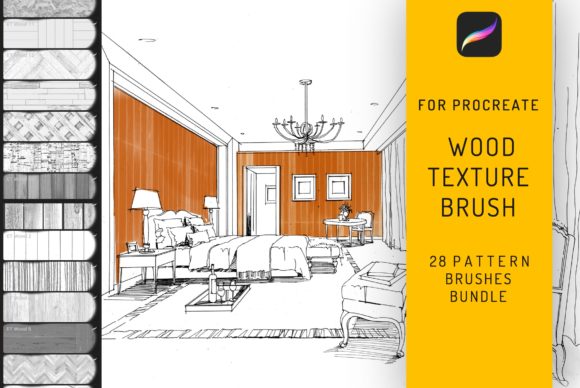
28 Procreate Wood Texture Brushes
Digital illustration has evolved far beyond flat colors and simple gradients. Today, audiences crave depth, tactility, and organic imperfection in visual storytelling. This is where the 28 Procreate Wood Texture Seamless Brush collection steps in, offering a robust toolkit for artists who want to infuse their work with the warmth and character of natural timber. Whether you are designing interior architecture concepts, sketching exterior facades, or creating intricate tattoo motifs, these brushes provide a level of realism that standard digital tools often lack.
Unlike generic texture overlays that can feel pasted on or disjointed, this bundle allows you to paint wood grain directly onto your canvas. The seamless nature of the brushes means you can cover large areas—such as wooden floors or expansive wall panels—without visible repetition breaks or awkward tiling lines. For professionals working in interior architecture and external design, this capability is invaluable. It bridges the gap between technical drafting and artistic presentation, allowing clients to visualize the mood and materiality of a space before a single plank is laid.
Bridging Digital Precision with Organic Warmth
The visual personality of the 28 Procreate Wood Texture Seamless Brush set is defined by its versatility. Wood is not a monolith; it ranges from the tight, subtle grains of maple to the bold, swirling patterns of oak and the rustic knots of pine. This pack captures that diversity. Each brush is engineered to respond to pressure and tilt, mimicking the way a physical tool might interact with a surface. This responsiveness is crucial for maintaining a natural look. When you are rendering a wooden floor, you need the grain to flow logically across the perspective. With these brushes, you control that flow, ensuring the texture aligns with the vanishing points of your architectural drawing.
Beyond architecture, these tools have found a surprising and effective niche in tattoo motifs. Traditional woodcut styles and botanical illustrations often rely on heavy linework and textured shading to create depth. By using these wood texture brushes, tattoo artists can simulate the look of aged timber or bark within their designs, adding a layer of complexity that appeals to clients seeking nature-inspired ink. The ability to layer different grain intensities allows for the creation of shadow and light effects that give the illusion of three-dimensional carving on skin.
For brand identity designers and marketers, texture is a powerful psychological trigger. Wood conveys stability, heritage, and eco-friendliness. When creating social media graphics or packaging design mockups, incorporating realistic wood textures can elevate a brand’s perceived value. It moves the design away from the sterile feel of pure vector art and into a realm that feels handcrafted and authentic. This is particularly effective for brands in the artisanal food, furniture, or sustainable goods sectors, where the material story is part of the product appeal.
Technical Compatibility and Workflow Integration
It is essential to understand the technical boundaries of this toolset to avoid frustration. These brushes are exclusively designed for the iOS app Procreate 4 and higher, optimized specifically for use with the iPad Pro. They leverage the Apple Pencil’s capabilities to deliver pressure-sensitive strokes that feel intuitive and responsive. These brushes DO NOT WORK IN PHOTOSHOP or any other desktop-based application. This limitation is not a drawback but a specialization. Procreate’s engine handles brush dynamics differently than raster-based desktop software, and these assets are coded to exploit those specific features for maximum performance and visual fidelity.
The package includes an instruction guidebook, which is often overlooked but critical for mastering the set. Because wood grain can look chaotic if applied without direction, the guide offers insights on stroke direction, layer blending modes, and opacity adjustments. For instance, using a "Multiply" blend mode can help integrate the wood texture into underlying color layers, while "Overlay" can enhance the highlights of the grain. Understanding these nuances transforms the brushes from simple stamps into dynamic painting tools.
The instant download format means you can integrate these assets into your workflow immediately. For freelancers and small business owners, time is a currency. Having a reliable library of high-quality textures at your fingertips eliminates the need to source stock photos, deal with licensing ambiguities, or spend hours photographing real wood samples. This efficiency allows you to focus on the creative aspects of editorial design or client presentations rather than getting bogged down in asset hunting.
Strategic Applications in Design and Marketing
When considering how to incorporate the 28 Procreate Wood Texture Seamless Brush into your projects, think about the narrative you are trying to tell. In web design, background textures can add depth to landing pages, provided they are optimized for load times. While these brushes are for creation, the resulting images can be exported and used as lightweight background elements that break up white space and guide the user’s eye. In logo design, while you typically want clean vectors, using wood textures in the conceptual phase can help clients visualize how a mark might look on physical signage or merchandise.
For content creators and bloggers, these brushes offer a way to differentiate visual content. A blog post about home renovation or DIY crafts becomes significantly more engaging when accompanied by illustrations that feature realistic material textures. It establishes authority and attention to detail. Similarly, publishers working on book covers or magazine layouts can use these textures to create atmospheric backgrounds that complement serif font or sans serif font typography. The contrast between the organic wood grain and structured type creates a sophisticated visual hierarchy.
Evaluating project fit is key. If you are working on a ultra-modern, minimalist tech brand, wood textures might clash with the desired aesthetic. However, for brands focusing on craftsmanship, longevity, or nature, these brushes are an ideal fit. Always test your font pairings against the texture. A delicate script font might get lost against a heavy oak grain, whereas a bold display font will stand out clearly. Experimentation is part of the process. Use the brushes to create custom backgrounds, then overlay your text to check for readability and contrast.
Ultimately, the 28 Procreate Wood Texture Seamless Brush bundle is more than just a set of digital stamps. It is a resource for adding soul to digital work. In an era where AI-generated images and stock photography dominate, hand-painted textures offer a unique signature. They allow designers, architects, and artists to maintain a human touch in their digital outputs. Whether you are detailing a cozy cabin interior, designing a rustic label for a craft beer, or sketching a forest-inspired tattoo, these tools provide the authenticity needed to connect with your audience on a deeper, sensory level.
Remember that consistency is vital in brand identity. If you choose to use wood textures in your marketing materials, ensure the style of wood aligns with your brand’s voice. A dark, moody walnut suggests luxury and seriousness, while a light, knotty pine suggests approachability and fun. By mastering this brush set, you gain the ability to toggle between these moods effortlessly, enhancing your versatility as a creative professional. The investment in learning these tools pays dividends in the quality and distinctiveness of your final deliverables.